Is a 1500VA UPS Enough for a Gaming PC?
A 1500VA UPS is enough for many gaming PCs when the PC and other battery-backed devices stay comfortably below its watt limit. Check output waveform and runtime at your measured load before choosing.
On this page (10 sections)
- Is a 1500VA UPS enough for a gaming PC's watts?
- How do you measure the load that actually matters?
- Does your gaming PC need pure sine wave output?
- How much gaming runtime should you plan for?
- Which devices belong on battery backup outlets?
- Which of these four 1500VA models should you choose?
- How should you set up a UPS for a gaming PC?
- How do you care for the battery and handle an outage?
- What mistakes make a 1500VA UPS the wrong buy?
- Is a 1500VA UPS enough for your gaming PC? Make the final choice
A 1500VA UPS is enough for many gaming PCs, provided the combined load stays comfortably below its watt limit and the battery gives you enough shutdown time. The VA label alone can't answer either question.
For most gaming desks, the goal is to survive a brief power cut, save progress where possible and shut down safely. Finishing a match takes more battery time and also depends on your internet connection staying available.
Is a 1500VA UPS enough for a gaming PC's watts?
A 1500VA UPS can be enough, but both its VA and watt limits matter. VA describes apparent power, while watts describe real power used by the connected equipment.
The models here support either 900 or 1000 watts despite sharing the same VA capacity. Choose by your combined load, then check runtime separately.
Is a 1500VA UPS enough for your gaming draw?
As a practical buying target, keep your demanding gaming load at about 70–80% of the UPS watt limit or less. This leaves room for changes in load, added equipment and readings that miss brief spikes.
That means roughly 630–720 watts on a 900-watt unit, or 700–800 watts on a 1000-watt unit. This is a planning margin, not a promise of a particular runtime.
A setup above that range deserves closer sizing, even if it remains under the absolute limit. Don't buy a unit expecting to use every available watt during normal play.
How do you measure the load that actually matters?
Measure wall power for every device that needs battery backup, with the PC running a demanding game. A plug-in power meter is more useful for UPS sizing than a CPU or GPU software reading.
Software often shows only selected components and leaves out conversion losses, the monitor and other devices. Check several demanding games, plus any rendering or streaming workload you regularly run.
A power-supply label describes its maximum DC output capacity, not its constant wall draw. An 850-watt power supply doesn't mean the PC always consumes 850 watts.
Also, don't assume wall draw must stay below that label. The supply uses some energy during conversion, so input power differs from the power delivered to components.
Record the highest sustained reading and leave headroom beyond it. A basic meter may miss very short load spikes, so its highest number isn't a complete picture of every instant.
A worked example for a gaming desk
Suppose your PC draws 480 watts during a demanding game, your monitor uses 45 watts and your network gear adds 20 watts. The battery-backed total is 545 watts.
That leaves 355 watts below a 900-watt output limit. It fits the planning margin above, but you still need the exact model's runtime curve at about 545 watts.
Now suppose a later GPU upgrade takes the combined draw to 780 watts. Revisit the UPS choice before the upgrade, since the old unit's unused outlet count won't provide extra capacity.
Does your gaming PC need pure sine wave output?
Choose pure sine wave output when the PC power-supply maker requires it or simulated-wave compatibility is unclear. It's the simpler choice for a new gaming setup with a modern power supply.
Active PFC doesn't automatically mean every simulated-wave UPS is incompatible. Check the supply maker's guidance rather than treating the presence of active PFC as the whole answer.
The CP1500AVRLCD3 uses simulated sine wave output; the other three choices here use sine wave output. That distinction matters when the UPS switches to battery.
Automatic voltage regulation, or AVR, serves a different purpose. All four models have it to correct certain voltage changes without using the battery, but AVR doesn't change a simulated waveform into a pure one.
Read pure sine wave vs simulated sine wave UPS for more on compatibility. Our best pure sine wave UPS battery backups guide covers other sizes.
How much gaming runtime should you plan for?
Plan for saving and shutting down, then buy more runtime only if you have a clear reason. A UPS that supports your watt load isn't automatically large enough to keep you playing through an outage.
Use the runtime curve for the exact model at your combined load. Don't divide a low-load runtime by the increase in watts, since battery runtime doesn't scale in a straight line.
APC's claim of up to 73 minutes at 100 watts describes a light load. It doesn't establish gaming runtime or prove that this model lasts longer than the others at your load.
Decide how much time you need to leave a game, save open work and complete shutdown. Add a reserve so a partly aged battery or a slower shutdown doesn't consume your whole window.
If long play sessions during outages are essential, compare larger battery systems rather than assuming another 1500VA model will solve it. See how long a UPS lasts in a power outage for the load and battery factors involved.
Which devices belong on battery backup outlets?
Put the PC and one usable monitor on battery backup first. Add the router and modem or fiber terminal if keeping the connection matters.
Backing up only the router may leave you offline if the modem or fiber terminal loses power. Your provider's equipment can also lose service, so local backup doesn't guarantee an online match will continue.
Use surge-only outlets for suitable nonessential gear, such as speakers and chargers. Those outlets don't keep equipment running during a cut, and moving devices there doesn't remove their normal draw from the wall circuit.
Skip heaters, kettles and laser printers on the UPS. Their loads can overwhelm a computer backup, and you should follow the UPS manual's limits for everything connected.
Count bulky plugs as well as devices. Six battery outlets may be enough on paper, while wide adapters can make some sockets hard to reach.
Which of these four 1500VA models should you choose?
Choose by load headroom, waveform compatibility and desk use before looking at styling. The table shows their main differences; runtime still needs checking at your own load.
| Product | Best for | Capacity | Battery waveform | Outlet split | Our score |
|---|---|---|---|---|---|
| CyberPower CP1500PFCLCD 1500VA Pure Sine Wave UPS | higher-power gaming PCs | 1500VA / 1000W | Sine wave | 6 battery backup / 6 surge-only | 8.9 |
| APC BR1500MS2 1500VA Pure Sine Wave UPS | shared work desks | 1500VA / 900W | Pure sine wave | 6 battery backup / 4 surge-only | 8.7 |
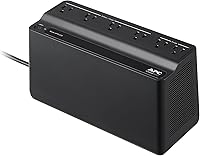
| APC Back-UPS Pro Gaming 1500VA BGM1500B | visible gaming setups | 1500VA / 900W | Pure sine wave | 6 battery backup / 4 surge-only | 8.3 |
| CyberPower CP1500AVRLCD3 1500VA Intelligent LCD UPS | compatible mixed-device desks | 1500VA / 900W | Simulated sine wave | 6 battery backup / 6 surge-only | 8.3 |
CyberPower CP1500PFCLCD 1500VA Pure Sine Wave UPS: Best for higher-power gaming PCs

- 1500VA / 1000W sine wave output
- 6 battery backup outlets and 6 surge-only
- Tilting color LCD
The highest watt capacity here makes this the first choice for a gaming desk that needs extra load headroom.
Pros
- Supports active PFC and conventional power supplies
- Tilting screen suits placement below a desk
- CyberPower includes battery coverage in its 3-year warranty
Cons
- Higher watt capacity doesn't establish longer runtime
- Only 6 outlets provide battery backup
The CP1500PFCLCD is the strongest fit here for a higher-power gaming PC that needs extra watt headroom. CyberPower specifies support for active PFC and conventional power supplies, making it a clear starting point when compatibility matters.
Its tilting screen helps when the tower sits below your desk. You can angle the display toward your seat instead of choosing a cramped spot just to read its status.
Choose it if your measured load makes the extra capacity useful or you expect a modest increase in demand. The extra surge-only sockets also suit desks with several nonessential peripherals.
Skip it if your setup already approaches its output ceiling or you need extended gaming runtime. More available watts allow a heavier load, but don't by themselves establish a larger energy reserve.
APC BR1500MS2 1500VA Pure Sine Wave UPS: Best for shared work desks

- 1500VA / 900W pure sine wave output
- 6 battery backup outlets and 4 surge-only
- User-replaceable APCRBC163 battery
A fit for a desk used for gaming and work, with pure sine wave output, load information and a user-replaceable battery.
Pros
- LCD shows load and battery status
- USB-A and USB-C charging ports
- APC backs it with a 3-year warranty
Cons
- The 100W runtime claim doesn't describe gaming runtime
- Less watt headroom than the CP1500PFCLCD
The BR1500MS2 suits a desk used for both gaming and work, especially when battery replacement is part of your long-term plan. Its user-replaceable APCRBC163 battery gives you a defined replacement option when the original battery wears out.
The LCD shows load and battery status, while front USB-A and USB-C ports handle device charging. Keep optional charging to a minimum during an outage if preserving the PC's shutdown window is the priority.
Choose it when your measured load leaves ample margin and you want a conventional tower for a shared work area. APC backs it with a 3-year warranty.
Skip it if you need the extra watt headroom of the first pick. Also avoid choosing it solely for the light-load runtime claim, since that number doesn't answer how long your gaming setup will run.
APC Back-UPS Pro Gaming 1500VA BGM1500B: Best for visible gaming setups

- 1500VA / 900W pure sine wave output
- 6 battery backup outlets and 4 surge-only
- 12 RGB colors and a status display
Choose this for a visible gaming desk where the angled runtime display and customizable lighting are useful.
Pros
- Display shows load wattage and remaining runtime
- Automatic voltage regulation
- Customizable lighting suits a visible setup
Cons
- Gaming styling adds no watt capacity
- A PC and console share the same output limit
The BGM1500B suits a visible gaming setup where the angled status display is easy to check from your chair. It shows load wattage and remaining runtime, which are useful when deciding how quickly to exit a game.
Its 12 customizable RGB colors let it fit the desk's lighting. Choose it because you'll use that display and styling, rather than assuming a gaming label provides more power.
A PC and console can share the unit only when their combined load, plus the display and other gear, fits with margin. If you sometimes run both together, size for that situation.
Skip it for an out-of-sight work desk where the lighting adds little value. It also isn't a substitute for a larger UPS when simultaneous gaming devices push the total too high.
CyberPower CP1500AVRLCD3 1500VA Intelligent LCD UPS: Best for compatible mixed-device desks
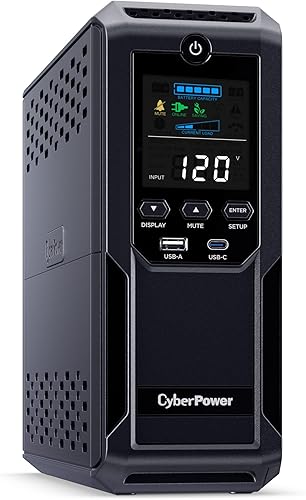
- 1500VA / 900W simulated sine wave output
- 6 battery backup outlets and 6 surge-only
- Color LCD and automatic voltage regulation
Consider this for a mixed-device desk when the PC's power supply supports simulated sine wave backup power.
Pros
- Separate battery and surge-only outlet groups
- USB-A and USB-C charging ports
- CyberPower includes battery coverage in its 3-year warranty
Cons
- Simulated output requires a power-supply compatibility check
- Extra outlets don't increase available power
The CP1500AVRLCD3 is a conditional choice for a mixed-device desk with confirmed simulated-wave compatibility. Its outlet split gives critical equipment battery support while leaving separate sockets for peripherals that only need surge protection.
The color LCD displays battery and power conditions, and USB-A and USB-C ports handle mobile-device charging. CyberPower backs the unit with a 3-year warranty that includes the battery.
Choose it if your current power supply supports its output waveform and your combined load leaves a comfortable margin. It can also suit a desk where the PC shares backup with network equipment.
Skip it if your supply requires pure sine wave output or compatibility remains uncertain. If a future PC upgrade is likely, reconsider the waveform requirements of the new supply before carrying this UPS forward.
How should you set up a UPS for a gaming PC?
Follow the model's setup instructions and charge the battery before relying on it. Some units need a shipping battery connection completed first, so read that step before switching everything on.
Place the UPS upright on a firm surface with its ventilation openings clear. Keep it away from heater vents, direct sun, damp areas and places where a spill could reach it.
Connect it directly to a suitable grounded wall outlet as directed by its manual. Don't chain UPS units together or add extension strips unless the manufacturer explicitly permits the arrangement.
Connect the PC, monitor and essential network gear to the marked battery outlets. Label the plugs so a later desk change doesn't put the PC on a surge-only socket.
If the model supports a computer communication connection and compatible shutdown software, configure automatic shutdown. USB charging ports aren't the same thing as a data connection for power management.
Use the built-in self-check function as the manual directs, after saving your work. For a power-loss check, follow the manufacturer's procedure rather than improvising by pulling the wall plug.
Set automatic shutdown with a reserve instead of waiting for the battery to reach empty. Check that the software can act while you're away, since a UPS alarm alone can't close programs.
How do you care for the battery and handle an outage?
Keep the UPS cool, ventilated and charged, and act promptly when power fails. Heat, age and repeated deep discharges reduce the backup time available.
During an outage, save open work and leave the game as soon as practical. Closing the game lowers demand, but don't turn a shutdown reserve into an unplanned extra play session.
After power returns, allow the battery to recharge before expecting another full backup window. Closely spaced outages can leave much less runtime than the first one.
Note the installation date and pay attention to battery warnings or a clear drop in runtime. Don't treat a warranty period or an average lifespan as a replacement schedule for every room and workload.
Use the exact approved replacement and follow the model's service instructions. Our guide to how long UPS batteries last explains when declining runtime points toward replacement.
Stop using a unit with unusual heat, swelling, leakage or a burning smell. Keep the enclosure closed unless the manual provides a user-service procedure, and send spent batteries to an approved recycling route.
What mistakes make a 1500VA UPS the wrong buy?
The biggest mistake is confusing output capacity with stored energy. A UPS may carry your PC comfortably yet provide too little time for the task you want to finish.
Other common buying errors are:
- Sizing from the PSU label. Measure wall draw for the full battery-backed setup.
- Using idle power. A desktop reading doesn't represent a demanding game.
- Ignoring upgrades. A new GPU, second display or simultaneous console use changes the total.
- Counting every socket as backup. Surge-only outlets lose power during a cut.
- Trusting a low-load runtime claim. Match the runtime curve to your measured watts.
- Planning to use the whole battery. Keep a reserve for shutdown delays and battery wear.
If the load is too high, moving a few phone chargers rarely solves the main problem. Reduce the major loads or choose a UPS with more capacity and suitable runtime.
Is a 1500VA UPS enough for your gaming PC? Make the final choice
A 1500VA UPS is enough for your gaming PC when the full battery-backed load fits with headroom, the waveform suits the power supply and runtime covers your shutdown plan. If any one of those checks fails, change the setup or UPS size.
Choose the CP1500PFCLCD for the most watt headroom here. Pick the BR1500MS2 for a shared work desk with a user-replaceable battery, or the BGM1500B when its visible display and lighting suit your setup.
Consider the CP1500AVRLCD3 only with confirmed simulated-wave compatibility. Don't choose any of these for extended gaming through outages without checking the runtime curve at your load.
For sizing beyond these four models, use what size UPS do I need. Then compare the best UPS options for a gaming PC against your measured watts and required shutdown time.
Frequently asked questions
Is a 1500VA UPS enough for a gaming PC?
A 1500VA UPS is enough for many gaming PCs if the combined load stays comfortably below its watt limit. Include the monitor and network gear, then check battery runtime at that total.
A unit that can carry the load may still offer less backup time than you need.
Does a 1000W PC power supply need a 1000W UPS?
No. A 1000W power supply describes its maximum output capacity, not constant wall draw.
Measure the PC while running demanding games and include other battery-backed devices.
Because the power supply also uses energy during conversion, wall draw can exceed the power delivered to the PC's parts.
Do I need pure sine wave output for a gaming PC?
Choose pure sine wave if your power-supply maker requires it or you can't confirm compatibility with simulated output. Active PFC alone doesn't prove every simulated-wave UPS will fail.
The power supply's requirements decide compatibility, while the UPS still needs enough watt capacity and runtime for your setup.
How long will a 1500VA UPS run a gaming PC?
Runtime depends on the exact UPS, combined load, battery condition and charge level. Use the model's runtime curve at your measured wattage rather than a light-load headline.
Plan to save and shut down promptly, since a gaming load can leave only a short window to act.