How Long Does a UPS Battery Last?
A typical sealed lead-acid UPS battery lasts about 3–5 years, with replacement planning starting around year 3. Heat, frequent discharge and long periods without charging can shorten its useful life.
On this page (8 sections)
- How long does a UPS battery last in normal use?
- What shortens a UPS battery's useful life?
- Which signs mean the battery needs attention?
- How can you track battery condition without draining it?
- Should you replace the battery or buy a new UPS?
- Which replacement cartridge should you choose?
- How should you install and care for a replacement?
- How long does a UPS battery last before you should act?
A typical sealed lead-acid UPS battery lasts about 3–5 years, but start planning for replacement around year 3. Its useful life ends when it can no longer give your equipment enough time to shut down safely.
Battery lifespan means years before replacement; runtime means minutes of backup during an outage. A battery can still hold a charge yet provide too little runtime for your needs.
You don't need to replace a healthy UPS just because its battery is aging. First check its condition, the connected load and whether the correct replacement cartridge is available.
How long does a UPS battery last in normal use?
Expect several years from a sealed lead-acid UPS battery kept cool and charged, with 3 years as a useful planning point. CyberPower gives an average life of 3 years for the RB1290X2 cartridge covered below.
A warranty is separate from expected battery life. It describes coverage under stated terms, not how long your equipment will stay powered or the date you should replace the battery.
How long does a UPS battery last during an outage?
Outage runtime depends on the connected equipment's power draw and the battery's remaining capacity. A router and modem usually draw much less power than a desktop computer and monitor, so the same UPS can support them for different lengths of time.
Use the guide to how long a UPS lasts during an outage if you need backup minutes rather than a replacement schedule. A cartridge's amp-hour figure alone doesn't tell you how long your setup will run.
What shortens a UPS battery's useful life?
Heat, repeated discharge and long storage without charging can shorten battery life. Improving the UPS location and charging habits can help you avoid an early replacement.
Keep the unit away from direct sun, heaters and a computer's hot exhaust. Leave the ventilation space required by its manual, and avoid closing it inside a crowded cabinet.
Every outage uses some of the battery's stored energy. Frequent deep discharges add wear, so use backup time to save work and shut down rather than running equipment until the UPS turns off.
A second outage before a full recharge gives you less backup time even with a healthy battery. Follow your model's charging guidance before deciding that reduced runtime means the battery has worn out.
An unplugged UPS also loses charge over time. If you're storing one, follow its recharge schedule instead of leaving it untouched for months.
Which signs mean the battery needs attention?
A battery warning, failed self-check or clear runtime loss deserves attention before the next outage. Compare performance with the same equipment connected, because a larger load can make a healthy battery appear weak.
Adding a monitor, external drives or another computer changes the power demand. If runtime fell after an equipment change, check the load before ordering a cartridge.
Start by allowing the battery to charge fully, then follow the manual's built-in self-check procedure. Avoid pulling the wall plug as a routine check, since that can interrupt work and may conflict with the maker's instructions.
A beep doesn't always mean battery failure. The APC Back-UPS 600 beeping guide explains how to separate common alarms before you buy a replacement.
Swelling, leakage, unusual heat or a burning smell needs prompt action. Stop using the unit and follow the manufacturer's safety guidance; don't force a swollen battery out of its compartment.
How can you track battery condition without draining it?
Keep a short maintenance log with the installation date, connected equipment and self-check results. Review it at least yearly and after a warning or a noticeable change during an outage.
If your UPS shows estimated runtime, record it under a similar load after a full charge. Treat that figure as an estimate, then compare the trend rather than expecting an exact shutdown time.
Note what happened during real outages, including whether the UPS lasted long enough to complete shutdown. You don't need to drain it deliberately to learn whether it still meets your needs.
For a computer or NAS, configure supported shutdown software so the device can stop safely before the battery runs low. Revisit that setting after changing the battery or adding equipment.
Should you replace the battery or buy a new UPS?
Replace the battery when the UPS is healthy and still suits your equipment. Consider a new UPS when its outlets, case or electronics are damaged, or when your current setup needs more capacity.
A fresh cartridge restores stored energy; it doesn't increase the UPS's supported load. If the unit signals overload, buying a larger battery cartridge isn't the solution.
Use the UPS sizing guide for VA, watts and runtime before replacing a unit that now supports more equipment. Your load must stay within both its watt and VA limits.
A failed self-check after a replacement needs investigation, not another automatic battery order. Confirm the cartridge match, connection and charging steps, then contact support if the fault remains.
For a healthy unit, compare the correct cartridge with a suitable replacement UPS. Include the unit's condition, available features and whether it still provides enough shutdown time in that decision.
Which replacement cartridge should you choose?
Choose by exact UPS model and any serial-number requirement, not battery size or brand alone. These cartridges solve different compatibility needs and aren't upgrades for one another.
The APC replacement battery guide walks through the matching process. For CyberPower, the CyberPower battery replacement guide explains the serial-number check.
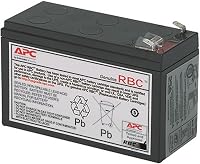
APC APCRBC154: for a healthy BE600M1
The APCRBC154 suits someone keeping a compatible APC Back-UPS in service after its battery loses useful runtime. APC names BE600M1, BE670M1, BN650M1 and BN675M1 as compatible models.
This is a valve-regulated lead-acid cartridge designed for user replacement, and APC backs it with a 2-year manufacturer warranty. Choose it when your matching UPS works normally apart from its worn battery.
Skip it if your model doesn't match or your equipment has outgrown the UPS. A new cartridge can't repair damaged outlets or provide a higher supported load.
APC RBC17: for compatible Back-UPS owners
The RBC17 suits owners of compatible APC units who want an assembled replacement cartridge. APC names BE650G1, BR700G, BE850G2, BE850M2, BX850M and BN900M among its compatible models.
It arrives assembled with replacement instructions, which helps avoid choosing separate battery parts and arranging connections yourself. Follow the UPS manual's procedure even if the cartridge supports a hot swap.
Skip it for a BE600M1 or any other model that calls for a different cartridge. Similar case shapes and nearby model numbers don't establish compatibility.
CyberPower RB1290X2: for matching CyberPower units
The RB1290X2 suits owners of compatible CyberPower UPS units needing a preassembled cartridge with two 12V/9Ah sealed lead-acid batteries. Its supported models include BRG1350AVRLCD, BRG1500AVRLCD, LX1500GU, CP1350AVRLCD, CP1500AVRLCD and CST150XLU.
For the CP1500PFCLCD, compatibility requires a serial number beginning with CXX. Check that identifier before ordering, even if the model name matches.
CyberPower includes an 18-month warranty and reusable packaging for taking expired batteries to a recycling center. Skip this cartridge if your model or required serial prefix doesn't match; battery count and capacity aren't enough to confirm fit.
How should you install and care for a replacement?
Follow your exact UPS manual, including its shutdown, connection and charging steps. Save work first, arrange another power source if needed, and keep metal tools and jewelry away from battery terminals.
Check the cartridge for damage before installation. Don't force a connector, reverse its polarity or improvise wiring to make a different battery fit.
After installation, let the UPS charge for the period its manual requires before relying on its full runtime. Complete the prescribed self-check and record the replacement date.
Sealed lead-acid cartridges don't need added water. Don't open them; routine care means keeping the UPS ventilated, charged and free of blocked vents.
Take the old battery to an approved battery recycler rather than household trash. Protect its terminals from contact with metal and follow the recycler's packing instructions.
How long does a UPS battery last before you should act?
Plan around year 3, then decide by condition and useful runtime. Replace the correct cartridge when a healthy UPS can no longer cover your shutdown needs; choose a new unit when capacity or hardware condition is the problem.
Buy the APCRBC154, RBC17 or RB1290X2 only after confirming the exact compatibility details above. If you're replacing the whole unit, use the UPS battery backup buying guide to choose one around your current equipment and required backup time.
Frequently asked questions
How often should a UPS battery be replaced?
Start planning for replacement around year 3, but use battery condition and useful runtime to make the decision; heat and frequent outages can bring the swap forward. Follow your model's maintenance schedule, and investigate a battery warning or failed self-check rather than waiting for a fixed birthday.
Can I replace a UPS battery myself?
You can replace the battery yourself if your UPS manual allows a user replacement and the battery compartment is undamaged. Match the exact cartridge, follow the shutdown and connection steps, and allow the required charging time afterward; stop if you find swelling, leaks, damaged wires or a battery that won't slide out.
Does a UPS battery lose charge if it sits unused?
Yes, a UPS battery slowly loses charge while the unit is unplugged, and prolonged storage without recharging can damage it. Follow the manual's storage and recharge schedule; before putting a stored UPS back into service, let it charge fully and complete its built-in battery check.