5 Best CyberPower UPS Battery Backups (October 2026)
The best CyberPower UPS battery backups for home desks include the CyberPower CP1500PFCLCD PFC Sinewave 1500VA for demanding desktop setups, the CyberPower CP1500AVRLCD3 Intelligent LCD 1500VA for compatible office equipment, and the CyberPower CP1000PFCLCD PFC Sinewave 1000VA for moderate desktop loads.
On this page (12 sections)
- How we chose these CyberPower UPS models
- The best CyberPower UPS battery backups for different desks
- Which CyberPower model fits your PC's power supply?
- How much UPS capacity does your desk need?
- How long should a CyberPower UPS keep working?
- How should you divide the battery and surge-only outlets?
- What should you do when setting up the UPS?
- What do AVR and the LCD add in daily use?
- How should you care for the battery and choose a replacement?
- CyberPower or APC for a home desk?
- Which buying mistakes should you avoid?
- Which best CyberPower UPS should you choose?
The best CyberPower UPS for most desktop setups is the CP1500PFCLCD, because it combines sine wave output with the highest watt limit in this group. The other models make sense when your load is lighter, your equipment accepts simulated sine wave power, or you want peripherals to switch off automatically.
Choose around the equipment you need to keep running and the time you need to save work. A UPS should give you a planned response to an outage, rather than leave you guessing when the battery alarm sounds.
If you're comparing brands too, the APC roundup covers alternatives.
Our picks at a glance
-
1
 Best for demanding desktop setups
CyberPower CP1500PFCLCD PFC Sinewave 1500VA
8.9/10 our score
See it on Amazon -
2
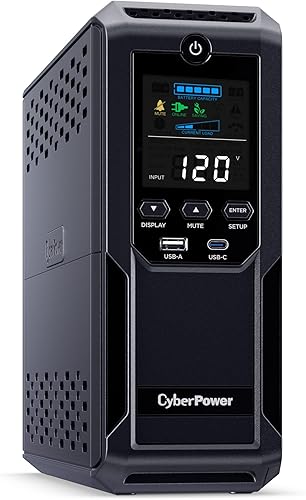 Best for compatible office equipment
CyberPower CP1500AVRLCD3 Intelligent LCD 1500VA
8.3/10 our score
See it on Amazon -
3
 Best for moderate desktop loads
CyberPower CP1000PFCLCD PFC Sinewave 1000VA
8.0/10 our score
See it on Amazon
- 4
 Check it
CyberPower EC850LCD Ecologic 850VA
Best for automatic peripheral shutoff - 5
 Check it
CyberPower CP850PFCLCD PFC Sinewave 850VA
Best for light desktop loads
How we chose these CyberPower UPS models
Output compatibility, usable power and outlet layout decide which of these models fits your desk. We compared those details alongside voltage regulation, controls, weight and warranty coverage.
The order favors a desktop buyer who needs power headroom and sine wave output. A lower-ranked model can still be the better choice for a light load or a desk that benefits from ECO control.
Runtime needs a separate check because VA and watts don't tell you how many minutes you'll get. No fixed outage runtime is assumed for any pick.
| Product | Best for | Capacity | Battery backup outlets | Total outlets | Our score |
|---|---|---|---|---|---|
| CyberPower CP1500PFCLCD PFC Sinewave 1500VA | demanding desktop setups | 1500 VA / 1000 W | 6 | 12 | 8.9 |
| CyberPower CP1500AVRLCD3 Intelligent LCD 1500VA | compatible office equipment | 1500 VA / 900 W | 6 | 12 | 8.3 |
| CyberPower CP1000PFCLCD PFC Sinewave 1000VA | moderate desktop loads | 1000 VA / 600 W | 5 | 10 | 8.0 |
| CyberPower EC850LCD Ecologic 850VA | automatic peripheral shutoff | 850 VA | 6 | 12 | 7.9 |
| CyberPower CP850PFCLCD PFC Sinewave 850VA | light desktop loads | 850 VA / 510 W | 5 | 10 | 7.6 |
The best CyberPower UPS battery backups for different desks
The CP1500PFCLCD is the strongest all-around choice here, while the other models serve more specific loads and habits. Use the sections below to decide where extra capacity helps and where it adds weight without solving your main need.
CyberPower CP1500PFCLCD PFC Sinewave 1500VA: Best for demanding desktop setups
- 1500VA and 1000W
- Sine wave output for active PFC supplies
- Six battery backup outlets and six surge-only
- Tilting color LCD panel
- Three-year warranty including the battery
Choose this model for a desktop setup that needs sine wave output and more power headroom. Its tilting screen helps when the UPS sits below your desk.
Pros
- Supports active PFC and conventional power supplies
- Highest watt limit in this group
- AVR corrects minor voltage fluctuations without battery use
- USB Type-A and Type-C charging ports
Cons
- Heaviest choice here at 24.9 pounds
- Six outlets provide surge protection without battery backup
CyberPower CP1500PFCLCD: best CyberPower UPS for demanding desktops
Choose the CP1500PFCLCD for a gaming PC or workstation whose measured load calls for more headroom. Its 1500VA/1000W capacity and sine wave output support active PFC and conventional power supplies.
AVR corrects minor voltage fluctuations without switching to the battery. That is useful where brief dips happen often, since each small change doesn't have to become a battery event.
The color display tilts upward, which helps when the unit sits low beside a desk. USB Type-A and Type-C ports can also charge portable devices during a utility outage.
Buy it when you need room for the PC, an essential display and other necessary devices. Skip it when your load is modest and moving a 24.9-pound unit would make access difficult.
This is also the sensible starting point for a planned PC upgrade, provided you size it for the future load. Extra headroom still needs a runtime check before you rely on it for a long shutdown window.
CyberPower CP1500AVRLCD3 Intelligent LCD 1500VA: Best for compatible office equipment
- 1500VA and 900W
- Simulated sine wave output
- Six battery backup outlets and six surge-only
- Color LCD panel
- USB Type-A and Type-C charging ports
A choice for office equipment that accepts simulated sine wave power. It combines a higher capacity than the smaller models with AVR and a color status screen.
Pros
- AVR handles minor voltage fluctuations without battery use
- Six battery backup outlets for essential devices
- CyberPower includes the battery in its three-year warranty
Cons
- Output compatibility needs checking for the connected equipment
- Lower watt limit than the other 1500VA model
- Heavy to move at 23.8 pounds
CyberPower CP1500AVRLCD3: for equipment that accepts simulated sine wave power
Choose the CP1500AVRLCD3 when your equipment supports simulated sine wave output and you want more capacity than the smaller units provide. Its 1500VA/900W limit puts it below the top pick in watt headroom despite the matching VA figure.
AVR and a color status screen make this a practical office choice. The Type-A and Type-C charging ports are useful for phones and tablets, but keeping the computer running remains the priority during an outage.
Confirm compatibility with the PC or power supply manufacturer before buying. A conventional power supply is a useful clue, but the connected equipment's requirements should settle the choice.
Skip this model if your equipment requires sine wave battery power or your planned load needs more room. Don't choose it solely because both larger models carry the same VA number.
The CP1500AVRLCD3 vs CP1500PFCLCD comparison explains the choice between these two units.
CyberPower CP1000PFCLCD PFC Sinewave 1000VA: Best for moderate desktop loads
- 1000VA and 600W
- Sine wave output for active PFC supplies
- Five battery backup outlets and five surge-only
- Tilting color LCD panel
- USB Type-A and Type-C charging ports
The middle choice for a measured desktop load that fits below its power limit with room to spare. It keeps sine wave output and AVR while weighing less than either 1500VA unit.
Pros
- Supports active PFC and conventional power supplies
- Lighter than either 1500VA model at 15.9 pounds
- Tilting display helps with low placement
Cons
- Less power headroom for future upgrades
- Five battery backup outlets require planning for larger setups
CyberPower CP1000PFCLCD: the middle choice for a measured desktop load
Choose the CP1000PFCLCD when you want sine wave output without the larger unit's weight and your load fits comfortably below 600W. Its 1000VA capacity makes it the middle PFC option here.
This model suits a work PC and essential accessories when measurement confirms enough headroom. “Mid-size desktop” is only a starting description, since similar-looking towers can draw very different amounts of power.
The tilting color screen helps with low placement, while AVR handles minor voltage changes without battery use. Two USB charging ports cover portable devices without using an AC outlet.
At 15.9 pounds, it's easier to reposition than either larger model, though you should still plan a stable location. Leave enough access to read the screen and reach the rear connections.
Skip it if a GPU upgrade or added equipment would push the load close to its limit. Choose the larger PFC model when the measured demand or required runtime justifies it.
CyberPower EC850LCD Ecologic 850VA: Best for automatic peripheral shutoff
- 850VA standby UPS
- Simulated sine wave output
- Six battery backup outlets and six surge-only
- Three ECO-controlled surge outlets
- ECO operation requires a USB connection
Choose this compact model for a light desk load and peripherals that should turn off when the computer sleeps or shuts down. Keep always-on devices away from its ECO-controlled outlets.
Pros
- Lightest choice here at 7.7 pounds
- ECO mode switches off selected peripherals with the computer
- Compact body with an LCD status panel
Cons
- ECO control requires the computer's USB connection
- Simulated sine wave output needs a compatibility check
- Standby topology differs from the line-interactive models
CyberPower EC850LCD: for a desk that powers down together
Choose the EC850LCD for a light load with peripherals that should switch off automatically. Its three ECO-controlled outlets cut power to connected accessories when the computer is off or asleep, with a USB connection required.
That can suit speakers, a scanner or another accessory you only use with the PC. Keep a router, NAS or any device that must stay awake off the ECO-controlled outlets.
This is a compact standby UPS with simulated sine wave output, rather than one of the line-interactive PFC units. Choose it for its layout and ECO function after confirming that your equipment accepts its output.
At 7.7 pounds, it's the easiest model here to move when arranging cables. Its low body also calls for a different placement plan than the upright towers.
Skip it for a demanding desktop or a setup where every connected device needs independent power control. The CyberPower EC850LCD review explains the ECO outlets and USB link in more detail.
CyberPower CP850PFCLCD PFC Sinewave 850VA: Best for light desktop loads
- 850VA and 510W
- Sine wave output for active PFC supplies
- Five battery backup outlets and five surge-only
- Tilting color LCD panel
- AVR for minor voltage fluctuations
A sine wave choice for a low-draw desktop with a small group of essential devices. Choose it after measuring the load and checking runtime needs.
Pros
- Supports active PFC and conventional power supplies
- AVR reduces battery use during minor voltage fluctuations
- CyberPower includes the battery in its three-year warranty
Cons
- Least watt headroom among the PFC choices here
- Weighs 14.9 pounds despite its lower capacity
CyberPower CP850PFCLCD: for a light desktop that needs sine wave output
Choose the CP850PFCLCD for a low-draw PC and a small set of essential devices. It provides sine wave battery power for active PFC and conventional supplies, with an 850VA/510W limit.
AVR and a tilting color display keep the main power-management features of the larger PFC choices. The reason to move up is more load capacity or a better runtime fit, rather than a different basic output type.
This model suits a stable setup with no major upgrade planned. Measure the computer while doing its hardest normal work, then include the display and any network equipment sharing battery power.
Skip it if that total leaves little room below the limit. A small desktop case doesn't prove that the complete setup is a light load.
Also check cable access before placing it in a narrow gap. At 14.9 pounds, it still needs a firm support and enough space to keep its ventilation clear.
Which CyberPower model fits your PC's power supply?
Match the battery output to your equipment's requirements, then choose the capacity. The three PFC models provide sine wave output; the AVRLCD3 and EC850LCD use simulated sine wave output.
Active PFC is a power-supply feature, not a measure of how much electricity the PC uses. It helps explain why output compatibility and load sizing are separate decisions.
The PFC models are the direct choice here when you want sine wave support for an active PFC supply. That doesn't mean every active PFC supply will reject simulated sine wave power.
Check the computer or PSU manufacturer's guidance when considering either simulated option. If you can't confirm compatibility, choose one of the sine wave models and size it for the load.
The pure sine wave guide explains where to find the relevant power-supply information. Resolve that question before comparing screen features or USB charging ports.
How much UPS capacity does your desk need?
Size the UPS for the combined load on its battery outlets, with room below both its watt and VA limits. Neither the PC's power-supply label nor the number of connected plugs gives you that total.
A desktop with an 850W PSU does not constantly draw 850W. Its actual draw changes with the hardware and workload, so use a suitable power meter or a careful estimate based on the equipment.
Include a demanding normal task, such as a game, render or other heavy work. An idle reading can make a busy desktop look much easier to support than it really is.
Add the essential monitor and networking gear to the computer's demand. For example, a 300W PC, 40W display and 20W network load total 360W before allowing headroom.
A practical starting target is to keep expected demand around 70–80% of the UPS watt limit or lower. That is planning room, not a promise of runtime or permission to ignore the VA limit.
For a deeper sizing example, use what size UPS you need. Recheck the total whenever you add hardware, especially a more demanding graphics card.
How long should a CyberPower UPS keep working?
Choose a runtime goal before choosing a capacity, since a short shutdown window and extended networking backup are different jobs. More VA doesn't automatically mean a specific number of minutes.
For a desktop, the main goal is usually enough time to save work and shut down cleanly. Long gaming sessions through an outage demand much more battery energy than a controlled shutdown.
Compare CyberPower's runtime guidance at a load close to your own. A runtime figure for a light load won't describe what happens with a busy workstation and several displays.
Battery age and condition also affect the time available. Plan around a margin rather than a countdown that ends at the last possible second.
For an always-on computer, configure supported shutdown software before an outage. A machine that nobody is watching needs an automatic response, even if the UPS can keep it running for a while.
How should you divide the battery and surge-only outlets?
Reserve battery outlets for devices that must keep working or shut down safely. Surge-only outlets protect against surges but won't keep equipment powered during an outage.
The larger models and EC850LCD each provide six battery outlets; the smaller PFC models provide five. Count your essential plugs before buying, including separate modem and router adapters if you use both.
Start with the PC and the display you need to save work. Add networking equipment if losing the connection would interrupt your shutdown or the work you intend to finish.
Put nonessential, compatible accessories on surge-only outlets. For a laser printer or another device with a large power surge, follow the UPS manual's connection limits rather than assuming any spare outlet is suitable.
A second monitor is optional for many shutdown plans, while a NAS may need battery support and its own shutdown arrangement. Decide by purpose and power draw, rather than treating either device as an automatic reason to buy larger.
Check plug shapes too. Wide adapters can block nearby sockets, so the outlet count alone doesn't prove that every plug will fit.
What should you do when setting up the UPS?
Follow the model's setup instructions, charge it as directed and configure shutdown behavior before relying on it. A UPS needs more preparation than a surge strip.
- Put it on a firm, dry surface with the ventilation clear.
- Connect the internal battery if the instructions require that step.
- Plug it directly into a suitable grounded wall outlet as directed by the manual.
- Allow the initial charge period before depending on its backup time.
- Connect essential equipment to battery outlets and label the cables.
- Install supported management software if you need automatic shutdown.
Avoid daisy-chaining power strips or UPS units. Position the unit so that you can reach its controls without pulling on a crowded bundle of cables.
CyberPower provides PowerPanel software for these models. Follow the instructions for the exact unit and operating system, including any required communication connection.
Choose shutdown settings that leave time for the computer to finish closing. For a NAS, use its own supported UPS-management process rather than assuming a desktop's settings will protect it.
For the ECO model, check which accessories should follow the computer's sleep state. A device that must remain available belongs on an appropriate non-ECO outlet.
What do AVR and the LCD add in daily use?
AVR handles minor voltage changes without battery use, while the LCD helps you understand the UPS's current condition. These features help with routine power management, but they don't replace load planning.
All four line-interactive models here have AVR. The EC850LCD uses standby topology, so it is a different choice for buyers comparing how a UPS responds to changing input power.
AVR matters most where small voltage dips or rises occur repeatedly. It can reduce unnecessary battery use during those events, while a full outage still calls for battery power.
Use the screen to review the available battery and power information after setup and after equipment changes. An unexpected warning deserves attention before the next outage.
The color screens on the PFC units tilt upward, which helps below a desk. Place any model where you can actually see its status instead of hiding it behind the computer.
How should you care for the battery and choose a replacement?
Keep the UPS cool, respond to battery warnings and match replacements to the exact unit. Batteries wear with age, heat and use, so treat their condition as part of routine desk maintenance.
Keep vents free of dust and avoid a hot enclosure or a spot beside a heater. After an outage, allow time for recharging before expecting the same backup reserve.
Repeated deep discharges reduce the margin available for future interruptions. Save work and shut down early when utility power is unlikely to return soon.
Keep the model number, serial number and receipt together. Similar model names don't establish battery compatibility, and replacement work should follow CyberPower's instructions for the exact unit.
The CyberPower battery replacement guide explains the replacement process. Use it alongside the manufacturer's compatibility guidance before ordering a cartridge.
CyberPower backs all five models with a three-year warranty that includes the battery. Check the coverage terms before paying for a replacement during that period.
Recycle removed batteries through an appropriate battery collection service. Don't put them in household trash or attempt to open the battery casing.
CyberPower or APC for a home desk?
Compare the exact models against the same load and runtime goal, rather than choosing by brand alone. Output type, usable watt capacity, battery outlets and shutdown support matter more than a familiar name.
CyberPower's PFC choices make the sine wave decision straightforward within this group. Still, a model from either brand needs enough capacity and the right connections for your equipment.
The APC vs CyberPower matchup helps with that comparison. Use the APC roundup if none of these outlet layouts or capacities suits your desk.
Which buying mistakes should you avoid?
The biggest mistakes are sizing by VA alone and expecting every outlet to provide backup. A few simple checks also prevent poor placement and shutdown plans.
- Buying from the PSU label: Measure the complete load instead of treating the PSU's maximum output as normal wall draw.
- Assuming matching VA means matching capacity: Check watts and runtime separately.
- Backing up every accessory: Reserve battery energy for work you need to save and devices you need to keep available.
- Using ECO outlets for always-on gear: Sleep-triggered shutoff can interrupt a router, NAS or charging task.
- Ignoring software: A UPS won't save an unattended computer's work merely by supplying power until the battery is empty.
- Buying for an unplanned upgrade: Include the future equipment's demand or accept that you'll need to size again later.
Also avoid placing the UPS where you can't read alerts or reach its plugs. A convenient service position makes battery care and equipment changes easier.
Which best CyberPower UPS should you choose?
Choose the best CyberPower UPS by output compatibility first, then load and runtime, using convenience features to settle the remaining choice.
Pick the CP1500PFCLCD for a demanding desktop that needs sine wave output and more power headroom. Choose the CP1500AVRLCD3 when your equipment accepts simulated sine wave power and its limits fit your setup.
The CP1000PFCLCD suits a moderate measured load, while the CP850PFCLCD suits a light desktop with little expansion planned. Choose the EC850LCD when automatic peripheral shutoff is a useful part of how your desk works.
Before ordering, write down your essential devices, their combined draw and the shutdown time you need. The UPS battery backup buying guide helps turn those requirements into a final choice.
Best CyberPower UPS: the final check
Buy only after confirming that your chosen unit supports the equipment and leaves enough backup time to act. Once it arrives, label the battery outlets and configure shutdown behavior so your outage plan is ready.
Our top 3 picks at a glance
-
1
Best for demanding desktop setups
CyberPower CP1500PFCLCD PFC Sinewave 1500VA
8.9/10 our score
See it on Amazon -
2
Best for compatible office equipment
CyberPower CP1500AVRLCD3 Intelligent LCD 1500VA
8.3/10 our score
See it on Amazon -
3
Best for moderate desktop loads
CyberPower CP1000PFCLCD PFC Sinewave 1000VA
8.0/10 our score
See it on Amazon
Frequently asked questions
What is a CyberPower PFC Sinewave UPS?
A CyberPower PFC Sinewave UPS supplies sine wave power during battery operation and supports active PFC and conventional power supplies; the three PFC models here use that output. Choose among them by your equipment's measured load, required runtime and battery outlet needs, rather than assuming every PC needs the largest model.
Which CyberPower battery fits my UPS?
Choose a replacement battery or cartridge confirmed for your exact UPS model and hardware version; keep the model and serial number with your receipt, then follow CyberPower's compatibility guidance and replacement instructions. Similar model names and matching battery voltage alone are not enough to establish the correct fit.
Is a CyberPower UPS good for a home office?
A CyberPower UPS can suit a home office when its output, power limits and runtime match your equipment; protect the computer and essential display first, then add networking devices if needed. Choose a PFC model for sine wave output, or confirm equipment compatibility before choosing either simulated sine wave option.


