UPS Battery Backups for Home Offices: The Buying Guide
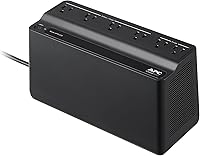
Choose a UPS battery backup by your equipment's power draw and required runtime, then check battery outlets and PC compatibility. The CyberPower CP1500PFCLCD suits demanding desktops, while the APC BE600M1 fits lighter loads.
On this page (16 sections)
- UPS battery backup basics for a home office
- How to size a UPS battery backup by watts
- How much runtime do you actually need?
- Line-interactive, standby and online units
- Pure sine wave or simulated sine wave
- APC or CyberPower for a home office
- Picks by job
- Set up your UPS before the next outage
- Use the battery to finish safely during an outage
- Batteries, beeping and replacement
- Single model reviews
- A buying checklist for a home office UPS
- Common mistakes that lead to the wrong UPS
- Which guide to read next
- Every guide on this site
- Which UPS battery backup should you buy?
A UPS battery backup buys time to save work and shut down safely when your home office loses power. Choose one by the watts your equipment draws, the minutes you need and the devices that must stay on.
The right unit for a router can be too small for a desktop PC. A larger unit can carry more equipment, but its watt limit alone won't tell you how long the battery will last.
Start by deciding what you want to happen during an outage: finish a short task, keep your network online or shut down a computer without losing work.
UPS battery backup basics for a home office
A home office UPS supplies temporary battery power when utility power fails. It bridges interruptions and gives you a controlled way to stop work during a longer outage.
What a UPS battery backup does
A UPS keeps devices connected to its battery outlets powered during a cut, within its capacity and available charge. When utility power returns, it resumes normal operation and recharges.
Surge protection and battery backup do different jobs. A surge protector helps limit voltage spikes but doesn't supply power during an outage, as UPS vs surge protector explains.
Voltage regulation is another separate feature. A unit with automatic voltage regulation, or AVR, can correct certain voltage changes without drawing on the battery.
What a UPS battery backup doesn't do
A UPS won't prevent software crashes, replace file backups or keep a desk running indefinitely. Save your work regularly even when your computer has backup power.
For an office computer, its main value is keeping an unexpected power cut from becoming an immediate shutdown. Do you need a UPS for your computer explains which setups benefit most.
A desk UPS also isn't a medical power system. Follow the device manufacturer's backup power guidance for medical equipment.
How to size a UPS battery backup by watts
Choose a UPS whose watt and VA limits both exceed your connected load, then check runtime separately. The large VA number on the box isn't a promise of battery life.
Watts describe real power use, while VA describes apparent power. A UPS has limits for both, so don't assume two units with the same VA can support the same equipment.
Measure the equipment that needs battery power
Make a list of the devices that must stay powered together. A typical list includes the computer, its main monitor and the network equipment needed for internet access.
Use a plug-in power meter to measure the combined draw during your normal work and your most demanding tasks. A computer at idle can draw much less than it does during a game, export or other heavy job.
A desktop's power supply label describes its capacity, not its constant use. A power supply marked 750W doesn't mean the computer always draws that amount.
Device input labels can help you build a cautious estimate when you can't measure. Don't mistake a laptop charger's maximum output for the laptop's steady draw either.
Leave room above your measured load
Choose capacity above your highest expected draw rather than buying a unit that barely fits. That leaves room for brief increases and modest changes to your desk.
As a general planning target, about 20% to 30% spare watt capacity is useful. More headroom may make sense if you expect a graphics upgrade, another display or extra storage.
For example, an illustrative desk drawing 400W could use a capacity target of about 500W or more. That calculation sets a power target, not a runtime estimate.
For the complete method, read what size UPS do I need. For the minutes available after a cut, read how long will a UPS last.
How much runtime do you actually need?
Buy enough runtime for a clear task, such as saving files and shutting down, rather than choosing the biggest advertised minute count. Runtime only means something when it includes the connected load.
A figure measured with a small load won't describe a busy desktop. Battery condition, charge level and temperature also affect the time available.
Choose a shutdown window
If your goal is safe shutdown, include time to notice the outage, save work, close programs and finish the shutdown. Storage systems may need their own time to stop background work.
Don't plan to use every minute before the battery runs out. Start shutting down while there is still a margin for a slow application or an unexpected delay.
For unattended equipment, automatic shutdown matters more than a screen you won't be there to read. Confirm communication and software support for the exact computer or storage system before buying.
Read runtime claims at the same load
APC gives the BX1500M a runtime figure of 68 minutes at 100W, while the BE600M1 is specified at 23 minutes at 100W. Those figures apply to that load and shouldn't be carried over to a demanding PC.
Don't divide a runtime figure in half just because your load doubles. Battery discharge behavior means runtime doesn't always scale in a straight line.
Use a manufacturer runtime chart at or above your expected draw. If a larger load leaves too little shutdown time, reduce the equipment on battery power or choose a different UPS.
Line-interactive, standby and online units
A standby UPS switches to battery when needed, a line-interactive UPS adds voltage regulation, and an online UPS uses continuous power conversion. For a home office, choose the type your equipment and power conditions require.
Standby designs can suit basic backup needs where utility power is generally stable. A line-interactive design is useful when voltage dips or rises occur often enough to make regulation valuable.
The CyberPower CP1500PFCLCD and APC BX1500M are line-interactive models with AVR. Their regulation can handle minor voltage changes without repeatedly using battery power.
Online designs can serve equipment with stricter power requirements, but they aren't automatically necessary for a home desk. Consider operating noise, heat and efficiency along with the electrical design.
Line-interactive vs online UPS for home use explains the tradeoffs. Don't choose by topology alone and overlook load capacity or shutdown support.
Pure sine wave or simulated sine wave
Choose pure sine wave output when your equipment requires it or when you want that compatibility feature for a demanding desktop. A simulated waveform is a stepped approximation of AC power.
Some computer power supplies work with either type, while others call for a particular output. Read the power supply manufacturer's guidance instead of assuming every gaming PC has the same needs.
The CyberPower CP1500PFCLCD explicitly provides sine wave output for active PFC and conventional power supplies. APC describes the BX1500M as active PFC compatible, but that statement alone doesn't establish its waveform.
Don't confuse AVR with sine wave output. AVR describes how a UPS handles incoming voltage changes, while the output waveform describes the battery power delivered to your equipment.
Read simulated sine wave vs pure sine wave for the difference and do I need a pure sine wave UPS for the PC decision.
If pure sine wave is on your required list, start with best pure sine wave UPS battery backups.
APC or CyberPower for a home office
Choose the model that fits your equipment rather than picking a brand first. The useful differences here are capacity, battery outlets, display information, maintenance and waveform support.
CyberPower's pick adds pure sine wave output and a tilting color screen. APC's larger pick provides load and estimated runtime information, while its smaller pick serves lower-power setups.
For a broader comparison, read APC vs CyberPower UPS. The CyberPower CP1500AVRLCD3 vs CP1500PFCLCD comparison helps if those similar model names are causing confusion.
For more options within each brand, see best APC UPS battery backups and best CyberPower UPS battery backups.
Picks by job
Choose the CyberPower for a demanding desktop, the larger APC for a busy office desk and the smaller APC for lighter equipment. Measure the load before deciding that any one of them fits.
CyberPower CP1500PFCLCD: for demanding desktops
The CP1500PFCLCD provides 1500VA/1000W, with 6 battery-backed outlets and 6 surge-only outlets. That combination suits a desktop plus the display, network gear and storage you need for a controlled shutdown.
Its color LCD tilts upward, which helps when the unit sits low beside a desk. USB-A and USB-C charging ports can power portable devices during an outage.
CyberPower includes downloadable PowerPanel management software and backs the unit with a 3-year warranty that includes the battery. Check software and communication requirements if automatic shutdown is part of your plan.
Choose it when pure sine wave output and higher watt capacity are useful requirements. A demanding computer still needs a runtime check, since supporting its load doesn't promise a long work session.
Skip it if you only need a small network backup and have limited space. At 24.9 pounds, it also needs a stable location where you won't have to move it often.
APC BX1500M: for a busy office desk
The BX1500M supplies 1500VA/900W, with 5 battery-backed outlets and 5 surge-only outlets. It fits an office where the essential plugs can be separated from peripherals that may turn off during an outage.
Its LCD shows battery charge, estimated runtime, load capacity and input voltage. These readings help you see the effect of adding equipment or starting a heavier computer task.
Coaxial and Ethernet surge protection may help if those connections match your setup. They don't replace keeping the modem, router and any other required network device on powered outlets.
The user-replaceable battery is the APCRBC124, sold separately. That gives you a specific replacement part to plan for as the battery ages.
Choose this APC for a measured office load that fits its capacity and 5 battery outlets. Skip it if you need more essential plugs or have made explicit pure sine wave output a buying requirement.
APC BE600M1: for light office loads
The BE600M1 provides 600VA/330W, with 5 battery-backed outlets and 2 surge-only outlets. Its compact form suits a small network or modest computer setup, but the watt limit matters more than the number of sockets.
A 1.5A USB port can charge a compatible phone during an outage. Audible alarms and LED indicators report power and UPS conditions without an LCD runtime screen.
The battery is user-replaceable with an APCRBC154 cartridge, sold separately. Plan for replacement rather than assuming the original battery will maintain its initial runtime indefinitely.
Choose it for low-power essentials after checking their combined draw. A router, modem and laptop charger can be a more suitable job than a desktop with a power-hungry graphics card.
Skip it for a demanding PC or a workstation already close to its capacity. Five available battery outlets don't mean you can fill them with any five devices.
Home office desk
For a desk with a PC, monitor and router, choose around the equipment you need to finish work safely. Best UPS for a home office compares options for that job.
For more desktop choices, see best battery backups for a desktop computer. Include the display in your load calculation if you need it to save work.
Gaming PC
Size a gaming setup around its draw during play, rather than at the desktop. Check power supply compatibility before deciding on the output waveform.
Best UPS for a gaming PC focuses on those needs, while is a 1500VA UPS enough for a gaming PC explains why the VA label isn't enough.
Routers and modems
For internet backup, power the whole local connection chain. That may include a modem or optical network terminal, a router and a network switch.
Best UPS for a router and modem covers AC-powered choices. Mini UPS for a router explains DC packs, where voltage, connector size and polarity must match.
Keeping your equipment powered doesn't guarantee internet service. Your provider's nearby equipment also needs power and a working connection.
NAS and Starlink
For a NAS, prioritize compatible automatic shutdown and enough time to complete it. A battery outlet alone can't tell the NAS when to stop.
Do you need a UPS for a NAS explains the job, and best UPS for a NAS covers model selection.
For a dish and router, do you need a UPS for Starlink explains which power connections and loads to include.
Set up your UPS before the next outage
Connect the battery as directed, charge the UPS and assign its outlets before relying on it. Installation details vary, so use the manual for the exact model.
Place it where it can shed heat
Choose a stable, dry spot with ventilation space around the case. Keep it away from heaters, direct sun, spills and places where dust gathers quickly.
Leave enough access to read the indicators and reach the controls. A unit pushed behind furniture is harder to maintain and easier to overlook when it sounds an alarm.
Plug the UPS directly into a suitable grounded wall outlet. Don't chain it through another UPS or a general-purpose power strip.
Map the outlets by purpose
Put essential equipment on the outlets marked for battery backup. Use surge-only outlets for suitable low-power peripherals that don't need to remain on.
Check power adapter shapes as well as outlet count. A wide plug can block a neighboring socket, leaving you with fewer usable connections than expected.
Keep space heaters, kettles and other high-draw appliances off the UPS. Check the manual before connecting a printer, particularly a laser printer with high peak demand.
Configure shutdown while power is available
If your setup supports UPS communication, connect the required cable and install compatible shutdown software. A USB charging port isn't the same as a data connection for shutdown control.
Choose a shutdown threshold that leaves time for the computer or NAS to finish. For a shared UPS, make sure each device that needs a shutdown signal can receive one.
Follow the manual's charge time before depending on full backup capacity. After setup, use the built-in self-check and confirm that the correct devices are on battery-backed outlets.
Use the battery to finish safely during an outage
Save work promptly when the UPS switches to battery, then reduce the load you no longer need. Don't wait for a low-battery alarm to begin a lengthy shutdown.
Stop games, video exports and other heavy tasks if your aim is to extend the shutdown window. Turn off a second display or nonessential accessory only after confirming it isn't needed to finish your work.
Treat estimated runtime as a changing guide. A sudden increase in computer load can reduce the minutes shown on a display.
If utility power returns quickly, remember that the battery has used some of its charge. Another outage soon afterward may leave less backup time.
A laptop already has its own battery, so you may get more useful backup by keeping only its network equipment on the UPS. Include the laptop charger only if it serves your outage plan.
Batteries, beeping and replacement
Replace a worn battery when it no longer provides the shutdown time you need or the UPS reports a battery fault. Age alone doesn't describe its remaining capacity.
Heat and repeated deep discharges can shorten battery service life. Avoid using a UPS as a routine portable power source if its intended job is standby protection.
An alarm can mean battery operation, overload, low charge or a fault. Why is my APC UPS beeping explains how to work through the common causes.
Use the exact replacement approved for your model and follow its isolation steps before opening the battery compartment. A switched-off UPS can still contain stored energy.
How to replace an APC UPS battery and how to replace a CyberPower UPS battery cover the process. How long does a UPS battery last helps you plan for maintenance.
Stop using equipment with a swollen or leaking battery, damaged wiring or signs of overheating. Arrange proper battery recycling rather than putting the old battery in household trash.
Single model reviews
Read the individual review when one model fits your shortlist and you need to check its tradeoffs. Pay closest attention to your load, outlet needs and replacement battery path.
- CyberPower CP1500PFCLCD review covers the pure sine wave choice for demanding desktops.
- APC BE600M1 review covers the compact choice for lighter equipment.
- APC BX1500M review covers the larger APC option for a busy desk.
- CyberPower EC850LCD review gives you another model to consider.
A buying checklist for a home office UPS
Buy only after the unit meets your power, runtime, outlet and compatibility needs. A feature you won't use shouldn't outweigh a shortfall in one of those basics.
- Define the job. Decide between brief continuity, safe shutdown and longer network backup.
- List essential equipment. Include every device needed to complete that job.
- Measure demanding use. Record more than the computer's idle draw.
- Check both capacity limits. Leave room above the expected load.
- Confirm runtime at that load. Allow time for shutdown before the battery is nearly empty.
- Count usable battery outlets. Include adapter spacing and essential network gear.
- Check PC and NAS compatibility. Confirm waveform needs and shutdown communication.
- Plan the location and maintenance. Check ventilation, access, battery parts and warranty coverage.
Write down those answers before comparing extra charging ports or screen designs. They turn a long list of UPS features into a short set of requirements.
Common mistakes that lead to the wrong UPS
The most costly mistake is solving only one part of the problem, such as outlet count, while ignoring power draw or runtime. Check the whole setup before you order.
Buying on VA alone
The VA number isn't a runtime figure or a substitute for watts. A unit can have enough outlets and still be unable to carry your computer during demanding work.
Keeping too much on battery power
Every unnecessary device uses part of the backup window. Separate equipment needed for shutdown from accessories that can lose power without causing trouble.
Expecting a UPS to replace backups
Battery power can help a computer stop safely, but it can't restore a deleted file or failed drive. Keep separate copies of important work.
Assuming an internet connection will survive
Your router staying on only solves the power problem inside your home. A provider outage can still stop calls, cloud work and remote access.
Ignoring battery warnings
A UPS that powers devices normally from the wall may still have a weak battery. Investigate warnings and reduced runtime before the next cut exposes the problem.
Which guide to read next
Start with sizing if you don't know your load, or move to a job-specific roundup if you do. What size UPS do I need turns your equipment list into a capacity target.
For the basic need, read do you need a UPS for your computer. For power supply compatibility, read simulated sine wave vs pure sine wave.
Every guide on this site
Use this directory to find the next detail you need, from battery care to a specific model. The groups follow the main buying and maintenance decisions.
Sizing, runtime and batteries
- Do you need a UPS for your computer
- What size UPS do I need
- How long will a UPS last in an outage
- How long does a UPS battery last
- Why an APC UPS beeps
- How to replace an APC UPS battery
- How to replace a CyberPower UPS battery
Pure sine wave and wave types
- Is a pure sine wave UPS necessary for a PC
- Simulated sine wave vs pure sine wave
- Best pure sine wave UPS battery backups
- Best UPS for a gaming PC
- Is a 1500VA UPS enough for a gaming PC
Routers, modems and NAS
- Mini UPS for a router
- Do you need a UPS for a NAS
- Do you need a UPS for Starlink
- Best UPS for a router and modem
- Best UPS for a NAS
Home office picks and brands
- Best UPS for a home office
- Best battery backups for a desktop computer
- Best APC UPS battery backups
- Best CyberPower UPS battery backups
- APC vs CyberPower UPS
- CyberPower CP1500AVRLCD3 vs CP1500PFCLCD
- UPS vs surge protector
- Line-interactive vs online UPS for home use
Single model reviews
Which UPS battery backup should you buy?
Choose your UPS battery backup by the job it must finish: carry a demanding desktop, protect a busy office desk or keep a few low-power essentials running. If it can't provide the required shutdown window, move to another option.
Pick the CyberPower CP1500PFCLCD when higher watt capacity and explicit pure sine wave output matter. Choose the APC BX1500M when your office load fits and you want visible load and runtime information.
Pick the APC BE600M1 for a measured light load, especially a small network or modest computer setup. Don't buy it for a demanding desktop simply because enough sockets are available.
Before ordering, use the UPS sizing guide to confirm your load and runtime target. That final check matters more than choosing the largest VA number.
Frequently asked questions
What is a UPS battery backup for a home office?
A UPS battery backup supplies temporary power when your wall power fails, giving connected devices time to keep working or shut down safely. Only its battery-backed outlets stay powered during an outage; it can protect your local network's power supply, but it can't keep an internet provider's equipment running.
How many watts does a home office UPS need?
Choose a UPS with a watt limit above the combined peak draw of the equipment you need on battery power. Measure demanding work as well as idle use, and leave room for brief increases; then check runtime at that load, because enough watt capacity doesn't guarantee enough minutes.
Is APC or CyberPower better for a home office?
Choose between specific models based on your load, required outlets and power supply needs. The CyberPower CP1500PFCLCD offers pure sine wave output and the highest watt capacity here; the APC BX1500M suits a busy desk, while the smaller BE600M1 fits lighter loads and limited space.
Do I need pure sine wave output for my PC?
Follow your PC power supply maker's UPS guidance, especially if it uses active PFC. Pure sine wave is a useful selection requirement when compatibility is uncertain, but active PFC alone doesn't settle every case; the CyberPower CP1500PFCLCD explicitly provides sine wave output for active PFC and conventional supplies.