CyberPower CP1500AVRLCD3 vs CP1500PFCLCD: Which Is Better? (October 2026)
In the CyberPower CP1500AVRLCD3 vs CP1500PFCLCD choice, pick the CP1500PFCLCD for active PFC compatibility. Choose the CP1500AVRLCD3 when your equipment supports simulated sine wave backup and its load fits comfortably within the watt limit.
On this page (12 sections)
- CyberPower CP1500AVRLCD3 vs CP1500PFCLCD: the differences that matter
- Which model suits your desktop, gaming PC, or home office?
- How much equipment can each UPS support?
- How long will either model keep your equipment running?
- Which outlets should you use for the computer and accessories?
- Will either mini-tower fit under your desk?
- How should you set up either CyberPower UPS?
- How do you care for the battery and plan replacement?
- What mistakes make this comparison harder than it needs to be?
- Who should skip the CP1500AVRLCD3, the CP1500PFCLCD, or both?
- Compare the two CyberPower models side by side
- CyberPower CP1500AVRLCD3 vs CP1500PFCLCD: make the final choice
For CyberPower CP1500AVRLCD3 vs CP1500PFCLCD, choose the CP1500PFCLCD for active PFC computers and the CP1500AVRLCD3 for equipment that supports simulated sine wave backup. Your equipment's power requirements matter more than whether the desk is used for gaming or office work.
Start with compatibility, then check the combined load and the time you need to save work. Neither model's capacity label tells you how long your particular setup will stay on.
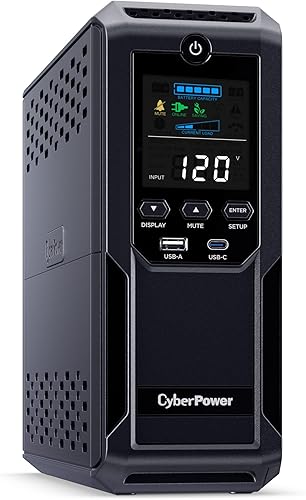 Best for conventional desktop setups
CyberPower CP1500AVRLCD3 Intelligent LCD 1500VA
 Best for active PFC computers
CyberPower CP1500PFCLCD PFC Sinewave 1500VA
CyberPower CP1500AVRLCD3 vs CP1500PFCLCD: the differences that matter
Battery output and watt capacity decide this comparison. The CP1500AVRLCD3 supplies simulated sine wave output at 1500VA/900W, while the CP1500PFCLCD supplies sine wave output at 1500VA/1000W.
That gives the PFC model a higher load ceiling and output designed for active PFC power supplies. It also supports conventional supplies, so choosing it does not require owning an active PFC computer.
Both are line-interactive units with automatic voltage regulation, or AVR. AVR corrects minor power fluctuations without drawing on the battery, which helps avoid needless battery use during small voltage changes.
Neither is an online UPS that continuously converts incoming power. The line-interactive vs online UPS guide explains when that design difference matters.
CP1500AVRLCD3 vs CP1500PFCLCD: check compatibility first
Choose the CP1500PFCLCD when your equipment calls for sine wave backup. Active PFC is a power supply feature, so the computer's graphics card, case size, or gaming label cannot settle compatibility.
Check the computer manufacturer's documentation or the exact power supply model. If the information is unclear, ask the manufacturer whether simulated sine wave UPS output is supported.
Do not open a power supply enclosure to look for an answer. For more help with the terminology, read whether your PC needs a pure sine wave UPS.
Active PFC does not make every supply behave identically on every stepped waveform. The PFC model is the straightforward choice here because CyberPower specifically designs its sine wave output for that use.
Which model suits your desktop, gaming PC, or home office?
The CP1500AVRLCD3 suits compatible conventional desktops; the CP1500PFCLCD suits active PFC computers and buyers who need its higher load ceiling. Match the UPS to the equipment rather than the job title of its user.
For a basic office desktop, the AVR model makes sense when the computer supports its output and leaves comfortable load headroom. Its role is to keep essential equipment running long enough to save files and shut down.
For a gaming PC or workstation with active PFC, choose the PFC model. Heavy graphics or processing work also makes checking peak demand more important than checking idle consumption.
A mixed work and gaming desk should be sized for the more demanding activity. A UPS that handles email comfortably may face a very different load during a game or render.
The best UPS for a gaming PC roundup gives you other choices if neither model fits your load or backup goals.
For networking gear alone, first decide how much runtime you need. A desktop-sized UPS can be useful, but choosing between these two by computer compatibility adds little value when no computer will be connected.
How much equipment can each UPS support?
Use the actual combined power draw of the battery-backed equipment, not the PC power supply's maximum label. A power supply's watt figure describes its output capacity, not what the computer constantly draws from the wall.
Measure the computer during a demanding task with a suitable plug-in power meter. Include the monitor and any networking or storage devices you intend to keep running.
For example, a computer drawing 400W, a 40W monitor, and 20W of networking gear create a 460W load. Those are example measurements, not runtime or power figures for either CyberPower model.
Leave headroom for brief peaks and future additions. Avoid building a setup that depends on staying just below the UPS limit every moment.
The PFC model's extra 100W can help with a modest load increase, but it is not a reason to run either unit near full capacity. If your present equipment already approaches the smaller model's ceiling, compare larger options too.
The guide to UPS sizing, VA, watts, and runtime explains how to turn measured demand into a sensible capacity choice.
How long will either model keep your equipment running?
You cannot get an exact runtime from the VA or watt limit alone. Compare manufacturer runtime information at your measured load, because a higher supported load does not establish a larger energy reserve.
Decide what you want the battery to accomplish before shopping. Saving a document and shutting down needs a different plan from keeping a router running through an extended outage.
For a desktop, count the time needed to notice the outage, save work, close applications, and shut down. Allow extra room if the machine runs tasks that take time to stop safely.
For network backup, removing an unneeded monitor or computer from the battery load can preserve energy for the router and modem. Backup power at home still cannot guarantee that your internet provider's equipment remains online.
Battery age, charge level, temperature, and load all affect useful backup time. The guide to UPS outage runtime helps you plan around those variables.
Which outlets should you use for the computer and accessories?
Put equipment needed during an outage on the battery-backed outlets. Both models provide 12 NEMA 5-15R outlets, split into 6 battery-backed and surge-protected outlets plus 6 surge-only outlets.
A typical priority list starts with the computer, one monitor, and networking equipment. Add storage only after accounting for its load and deciding how it will shut down.
Surge-only outlets suit compatible accessories that can stop immediately without disrupting your work. Those outlets do not keep a device running when utility power fails.
Label the critical plugs so you can see the arrangement without tracing every cable. Accidentally putting the computer on the surge-only side defeats the main purpose of buying a UPS.
Avoid treating spare outlets as permission to attach heaters, kettles, or other high-draw appliances. Follow CyberPower's instructions for permitted loads, especially for devices such as laser printers.
If you need more battery outlets, choose a model with the right arrangement. More watt capacity does not automatically provide more places to connect essential equipment.
Will either mini-tower fit under your desk?
Both need a stable spot with ventilation and room for plugs. The CP1500AVRLCD3 measures 13.78 x 3.94 x 10.2 inches and weighs 23.8 pounds; the CP1500PFCLCD measures 14 x 3.9 x 11 inches and weighs 24.9 pounds.
Measure the full usable space rather than just the shelf opening. Rear plugs and cable bends need room beyond the case dimensions.
The AVR model has a 6-foot power cord. The PFC model has a 5-foot cord with a right-angle, 45-degree-offset input plug, so wall outlet position can affect placement.
Put either unit where it cannot tip, block your feet, or collect spilled drinks. A floor position can work, provided the surface is dry and the vents stay clear.
The PFC model's color screen tilts up to 22 degrees, which helps when reading it from above. Both screens show battery and power conditions, so keep the front visible enough to notice alerts.
How should you set up either CyberPower UPS?
Follow the exact model's startup instructions, charge it, and confirm the outlet assignments before relying on it. Read any battery connection steps in the manual rather than assuming the unit is ready immediately.
Connect the UPS as CyberPower directs, using a suitable grounded wall outlet. Avoid extending the setup through another UPS or a chain of power strips.
The CP1500AVRLCD3 has an 8-hour battery charge time. Use the CP1500PFCLCD's own instructions for its initial charge rather than applying that figure to both models.
Once charged, connect essential equipment and check the display for warnings. Check the load during normal work and during the most demanding task you expect to run.
Both provide Type-A and Type-C USB charging ports for portable devices. These charging ports serve a different purpose from any data connection used to communicate with a computer.
CyberPower offers downloadable PowerPanel software for both models. Check operating system support and the model's connection instructions before planning automatic shutdown.
If unattended shutdown matters, configure the software and verify communication using its documented checks. Installing software alone does not establish that the computer will shut down at the right time.
How do you care for the battery and plan replacement?
Keep the UPS cool, dry, and ventilated, and respond to battery alerts promptly. Heat and repeated deep discharges can shorten the useful life of UPS batteries.
After an outage, allow the unit to recharge before expecting its full backup capability again. Avoid repeatedly draining it just to see how long it can run.
CyberPower gives the CP1500AVRLCD3 an average battery life of 3 years. Treat that as a planning estimate, since actual service life depends on conditions and use.
CyberPower backs both models with a three-year warranty that includes the battery. That coverage period is separate from the amount of time a charge will power your equipment.
Record the installation date and keep the model details with the receipt. When replacement is needed, match the exact model and approved battery assembly rather than choosing by case size.
The CP1500PFCLCD uses two 12V batteries, but voltage and quantity alone do not identify a suitable replacement. Follow the model-specific instructions and recycle old batteries through an appropriate collection service.
Our CyberPower UPS battery replacement guide explains how to prepare for the swap.
What mistakes make this comparison harder than it needs to be?
The biggest mistakes are sizing by the PC power supply label and treating capacity as runtime. Both can lead you to choose a unit that misses your actual goal.
Another mistake is assuming that the name “AVR” identifies a feature exclusive to the CP1500AVRLCD3. Both models have voltage regulation, so that feature does not separate them.
Do not choose only by the number of sockets on the back. Count the devices that must remain powered, then check their combined demand and the battery-backed outlet count.
Buying for an imagined future computer can also distort the choice. Allow reasonable growth, but select a larger unit if a planned upgrade would consume nearly all available headroom.
Finally, do not assume that replacing an old UPS battery changes its output compatibility or load ceiling. A fresh battery can restore lost backup capability, but it does not turn a simulated sine wave design into a sine wave model.
Who should skip the CP1500AVRLCD3, the CP1500PFCLCD, or both?
Skip the AVR model when your equipment requires sine wave backup, and skip both when your load or runtime goal exceeds their capability. A different UPS may be the right answer even if these two look similar.
The CP1500AVRLCD3 is a poor choice when compatibility remains unresolved for an important active PFC computer. Resolve that question before ordering, or choose the model designed for active PFC support.
The CP1500PFCLCD can be more capability than you need for a small, compatible setup. Its slightly larger case also matters if your available space is fixed.
Neither should be chosen for hours of desktop operation without checking load-specific runtime information. A battery backup intended to allow shutdown should not be treated as an unlimited power source.
Skip both if your equipment requires a different supply voltage or outlet system. The models here use US-style plugs and outlets, so check the electrical requirements at your location.
Compare the two CyberPower models side by side
Use this table to confirm capacity, output, and outlet needs after checking your equipment. These figures help narrow the choice, while your measured load and required runtime finish it.
| Product | Best for | Capacity | Output | Outlets | Our score |
|---|---|---|---|---|---|
| CyberPower CP1500AVRLCD3 Intelligent LCD 1500VA | conventional desktop setups | 1500VA / 900W | Simulated sine wave | 12 (6 battery backed) | 8.3 |
| CyberPower CP1500PFCLCD PFC Sinewave 1500VA | active PFC computers | 1500VA / 1000W | PFC sine wave | 12 (6 battery backed) | 8.9 |
CyberPower CP1500AVRLCD3 vs CP1500PFCLCD: make the final choice
Choose the CP1500PFCLCD for active PFC compatibility or the higher watt ceiling. Choose the CP1500AVRLCD3 when your equipment supports simulated sine wave output and your measured load leaves comfortable headroom.
Before ordering, write down your essential devices, their combined demand, and your shutdown time goal. Those three checks make the CyberPower CP1500AVRLCD3 vs CP1500PFCLCD decision practical rather than a contest between model names.
If the PFC model fits those needs, the CyberPower CP1500PFCLCD review covers it in more detail.
For a broader equipment plan, use the UPS battery backup guide. If you're also weighing another brand, the APC vs CyberPower UPS comparison is the next useful step.
Frequently asked questions
What is the difference between the CP1500AVRLCD3 and the CP1500PFCLCD?
The main differences are battery output and watt capacity; the CP1500AVRLCD3 supplies simulated sine wave backup at up to 900W, while the CP1500PFCLCD supplies sine wave backup at up to 1000W and supports active PFC power supplies. Both offer automatic voltage regulation and the same battery outlet count.
Is the CP1500PFCLCD better than the CP1500AVRLCD3?
The CP1500PFCLCD is the stronger choice for active PFC computers or equipment that calls for sine wave backup; the CP1500AVRLCD3 remains a useful choice for compatible equipment with a lower combined load. Choose by power requirements first, then check runtime needs, placement, and the number of essential devices.
Do both CyberPower models have the same battery warranty?
Yes, CyberPower backs both models with a three-year warranty that includes the battery; warranty coverage does not mean every battery will deliver the same service life or outage runtime. Keep your receipt and model information, follow the care instructions, and review the warranty terms before arranging service.
Does a 1000W UPS run longer than a 900W UPS?
A higher watt limit does not automatically mean longer backup time; it tells you how much load the UPS can support, while runtime also depends on battery capacity, battery condition, and the connected load. Compare manufacturer runtime information at the same watt load before choosing either model for a specific duration.

