5 Best APC UPS Battery Backups (October 2026)
The best APC UPS battery backups for home desks include the APC Back-UPS Pro BR1500MS2 1500VA Pure Sine Wave for demanding PC setups, the APC Back-UPS Pro BX1500M 1500VA for full home offices, and the APC Back-UPS BE600M1 600VA for modest desktop setups.
On this page (11 sections)
- How these APC UPS picks were chosen
- The best APC UPS models for different home setups
- How to choose APC UPS capacity without oversizing
- What APC's runtime figures mean for your desk
- When pure sine wave and AVR should decide your choice
- Set up your APC UPS around a safe shutdown
- Keep the whole network running, not just the router
- Care and replacement batteries across the APC line
- Common mistakes that lead to the wrong APC UPS
- Should you compare APC with CyberPower before buying?
- Choose the best APC UPS for your actual load
The best APC UPS for a demanding home PC is the BR1500MS2, especially when the computer requires pure sine wave backup power. The BX1500M suits a larger office desk, while the smaller Back-UPS models fit modest computers and network gear.
Choose around the equipment that must stay on and the time you need to shut it down. A higher power limit lets a UPS support a bigger load, but it doesn't tell you how long your particular setup will run.
If you're comparing brands as well as sizes, our CyberPower roundup gives you another set of options.
Our picks at a glance
-
1
 Best for demanding PC setups
APC Back-UPS Pro BR1500MS2 1500VA Pure Sine Wave
8.7/10 our score
See it on Amazon -
2

-
3

How these APC UPS picks were chosen
These picks cover small network setups through larger workstations, with scores based on power capacity, useful connections, runtime claims and maintenance features. BreakerGuide compared the supplied specifications, with particular attention to what each model lets you keep running.
The order follows score, but your device count and power needs should decide the purchase. A small network shelf can be better served by a compact unit than by the highest-ranked tower.
| Product | Best for | Capacity | Battery backup outlets | Total outlets | Our score |
|---|---|---|---|---|---|
| APC Back-UPS Pro BR1500MS2 1500VA Pure Sine Wave | demanding PC setups | 1500 VA / 900 W | 6 | 10 | 8.7 |
| APC Back-UPS Pro BX1500M 1500VA | full home offices | 1500 VA / 900 W | 5 | 10 | 8.5 |
| APC Back-UPS BE600M1 600VA | modest desktop setups | 600 VA / 330 W | 5 | 7 | 8.5 |
| APC Back-UPS BE850G2 850VA | shared network shelves | 850 VA / 450 W | 6 | 9 | 8.4 |
| APC Back-UPS BE425M 425VA | basic internet backup | 425 VA / 255 W | 4 | 6 | 7.2 |
The best APC UPS models for different home setups
Choose the BR1500MS2 for a PC that needs pure sine wave power, then consider the other models according to load, outlet needs and available space. Each recommendation below includes a reason to choose it and a reason to move on.
APC Back-UPS Pro BR1500MS2 1500VA Pure Sine Wave: Best for demanding PC setups
- 1500VA and 900W
- Pure sine wave output
- Six battery backup outlets and four surge-only
- Front USB-C and USB-A charging ports
- APC runtime claim: up to 73 minutes at 100W
- User-replaceable APCRBC163 battery, sold separately
Choose this model for a workstation that needs pure sine wave backup power and room for several essential devices. Its weight and charging time call for a planned location and recharge window.
Pros
- Pure sine wave backup output
- AVR corrects high and low input voltage
- LCD shows load and battery status
Cons
- Weighs 27.6 pounds
- APC specifies a 16-hour charge time
APC BR1500MS2: best APC UPS for demanding PC setups
The BR1500MS2 is the strongest choice here for a workstation whose power requirements call for pure sine wave backup output. It pairs that output with automatic voltage regulation, which corrects high or low input voltage without using the battery.
Its six battery backup outlets give you room to keep a computer, display and supporting devices on the same protected supply. Use those connections for equipment needed to save work, rather than filling them with every accessory on the desk.
The LCD makes load and battery status easier to track. Front USB charging also keeps a phone cable accessible without reaching behind the tower.
Choose it for a demanding computer when both waveform compatibility and capacity matter. Skip it for a router-only corner where its size and weight would add little practical value.
Plan its position before connecting cables, since this is a heavy unit to move around a crowded desk. Also allow for its longer stated charging time after installation or a deep discharge.
APC Back-UPS Pro BX1500M 1500VA: Best for full home offices
- 1500VA and 900W
- Ten outlets, five with battery backup
- LCD shows charge, load, runtime and input voltage
- Automatic voltage regulation
- APC runtime claim: 68 minutes at 100W
- User-replaceable APCRBC124 battery, sold separately
A fit for a larger office desk when five battery backup connections cover the essential equipment. The screen helps you monitor the load and plan a shutdown.
Pros
- Separate battery backup and surge-only outlet groups
- LCD includes estimated runtime
- AVR reduces battery use during voltage swings
Cons
- Confirm output compatibility if your equipment requires pure sine wave
- About 15 inches deep
APC BX1500M: a larger office desk with clear status information
The BX1500M fits a home office that needs more power capacity and a readable status screen. Its LCD shows charge, load, estimated runtime and input voltage, which helps you decide when to finish work and shut down.
Five battery backup connections can cover a computer, monitor, modem, router and one storage device. Count actual plugs before buying, since a separate network switch or another required device would change that plan.
Its AVR is useful where voltage dips or rises occur without a full outage. That feature can correct those conditions without spending battery charge on each event.
Choose it when its capacity and outlet split suit your office and its output meets your equipment's requirements. If pure sine wave is a stated requirement, choose the BR1500MS2 from this group.
Skip it if you have a shallow shelf or need a compact unit beside a modem. Our APC BX1500M review covers its layout and maintenance in more detail.
APC Back-UPS BE600M1 600VA: Best for modest desktop setups
- 600VA and 330W
- Seven outlets, five with battery backup
- APC runtime claim: 23 minutes at 100W
- USB charging works during outages
- User-replaceable APCRBC154 battery, sold separately
A compact choice for a low-power desktop and networking gear when the goal is saving work and shutting down. Measure the combined load before adding a monitor and other devices.
Pros
- Five battery backup connections in a compact unit
- USB port can charge a phone during an outage
- Replaceable battery extends service options
Cons
- Limited headroom for a power-hungry PC
- Runtime falls as the connected load rises
APC BE600M1: a modest desktop with a shutdown plan
The BE600M1 suits a low-power desktop and a few essential devices when the goal is saving work before shutting down. Its compact layout is easier to place than a larger tower, and it still provides five battery backup connections.
Do the power check before buying, especially if the computer runs demanding software. A small case or a basic-looking desk doesn't prove that the combined load will fit.
Its USB charging port works during an outage, which is useful for keeping a phone available after the computer is off. That gives you a way to check messages without leaving a larger load running.
Choose it for a modest desktop, one necessary display and networking gear that fit within its limits. Skip it for a high-draw workstation or a setup expected to keep working through a lengthy blackout.
The replaceable battery makes it worth maintaining as your desk changes. Recheck the load when you add a larger display, external storage or a different PC.
APC Back-UPS BE850G2 850VA: Best for shared network shelves

- 850VA and 450W
- Nine outlets, six with battery backup
- APC runtime claim: up to 35 minutes at 100W
- Two USB-A charging ports
- User-replaceable RBC17 battery, sold separately
- Silenceable alarm and LED indicators
Useful when several modest devices share a network shelf or desk. Its battery backup outlet count suits a modem, router, switch and storage setup, provided the total load fits.
Pros
- Six battery backup connections
- Alarm can be silenced
- APC provides a 3-year warranty
Cons
- A larger PC can consume much of its power allowance
- LED indicators offer less detail than the Pro models' LCDs
APC BE850G2: several devices on one network shelf
The BE850G2 is a useful middle option when several modest devices need separate backup connections. Its six battery backup outlets suit a network shelf with a modem, router, switch and storage equipment, as long as the combined draw fits.
That outlet count can matter more than a larger watt limit for this kind of setup. A network shelf may use modest power while still needing several AC adapters connected at once.
The silenceable alarm helps when the equipment sits near a work area, while the LEDs show its status. Keep the unit visible enough that silencing an alarm doesn't leave a fault unnoticed.
Choose it when you need more connections than the smaller models offer without moving to a Pro tower. Skip it if your main load is a demanding PC that leaves too little spare capacity.
For NAS use, also confirm the shutdown connection and software your storage system requires. Available outlets alone don't establish that a UPS can tell the NAS to shut down.
APC Back-UPS BE425M 425VA: Best for basic internet backup
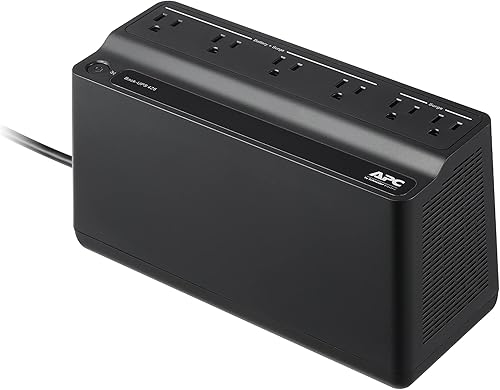
- 425VA and 255W
- Six outlets, four with battery backup
- Compact, wall-mountable design
- APC runtime claim: up to 15 minutes at 100W
- APC provides a 3-year warranty
Choose it for a small group of low-power essentials, such as a modem and router. It makes the most sense when saving space matters more than backing up a full workstation.
Pros
- Wall-mountable design
- Four battery backup connections
- Weighs 5.7 pounds
Cons
- Lowest power capacity in this group
- Shortest stated runtime here at the shared comparison load
APC BE425M: basic internet equipment in a small space
The BE425M fits a modem, router and a few low-power essentials where space is tight. Its wall-mountable design gives you another placement option when the floor or desk is crowded.
Four battery backup connections can be enough for a simple internet setup. Check for separate equipment elsewhere in the home, though, since a powered router can't replace an unpowered modem or optical network terminal.
Choose it when you want to bridge short interruptions or keep basic networking gear on while you decide what to do next. It can also suit other small electronics when their measured load and required runtime fit.
Skip it for a full workstation or a plan that depends on long backup time. A laptop's own battery may already cover the computer, making the network equipment the more useful load to protect.
Keep access to the status lights and alarm controls after mounting it. Hiding a UPS behind furniture makes it harder to notice a warning or check the connections.
How to choose APC UPS capacity without oversizing
Choose a UPS by measured watts, required connections and useful runtime, rather than the VA number alone. Both watt and VA limits matter, and neither should be exceeded.
Measure the equipment that must stay on
Add the computer, necessary display, networking gear and storage that need backup. Leave out equipment you can stop using as soon as utility power fails.
A plug-in power meter helps you measure normal use and a demanding workload. Check the computer while it performs its usual heavy task, since an idle reading can understate what the UPS must support.
A PC power supply's label gives its maximum rated output, not the computer's constant wall draw. Buying around that number alone can lead you toward the wrong size.
Leave about 20 to 30 percent spare capacity as a planning margin, with more room where demand changes sharply. That margin helps with future additions, but it doesn't replace checking runtime at the expected load.
Count essential plugs separately
Count the AC adapters and power cords that must use battery backup. The total outlet count includes surge-only connections, which stop supplying power during an outage.
Check adapter shapes, too, since a wide power brick can block a neighboring connection. Don't plan around every socket being usable until you have considered the plugs going into it.
Decide whether you need minutes or continued work
Choose a shutdown window first: enough time to notice the outage, save files and close equipment safely. If you want to continue working, allow extra time for the actual task and a safe shutdown afterward.
For a fuller sizing walkthrough, use our guide to UPS watts, VA and runtime.
What APC's runtime figures mean for your desk
Use APC's 100W runtime claims as a shared comparison point, not as a promise for every computer. The figures run from 15 minutes for the BE425M to 73 minutes for the BR1500MS2.
The BE600M1, BE850G2 and BX1500M fall between them at 23, 35 and 68 minutes. These claims help compare the five units at the same load.
A heavier load uses the battery faster. You can't reliably calculate runtime by assuming that doubling the watts will simply cut the time in half.
Battery condition, temperature and starting charge also affect the result. A UPS recovering from one outage may have less reserve when the next interruption arrives.
Use a model's runtime curve for your expected load when available, and keep a shutdown margin. Don't plan an essential task around consuming the final minute of estimated battery time.
Our guide to how long a UPS lasts in an outage explains how to turn a runtime estimate into a practical plan.
When pure sine wave and AVR should decide your choice
Choose pure sine wave when your equipment requires it, and consider AVR when recurring voltage swings are part of the problem. These features address different needs.
Pure sine wave describes the AC waveform supplied on battery. The BR1500MS2 provides it, making that model the clear choice here when the connected equipment calls for this output.
Active PFC doesn't mean every computer power supply has identical backup requirements. Check the computer or power supply guidance instead of assuming all gaming PCs need the same UPS.
AVR corrects input voltage within the UPS's supported range without drawing on the battery. The BR1500MS2 and BX1500M both include it, which can preserve charge during repeated voltage dips.
Our guide to whether you need pure sine wave explains the compatibility question. Neither waveform nor AVR turns a short-runtime UPS into a long-outage power source.
Set up your APC UPS around a safe shutdown
Put the UPS in a dry, ventilated location, connect the battery as directed and charge it before depending on backup power. Follow the model's manual for the battery connection and initial charging period.
Place it where you can reach it
Keep vents clear and avoid heat sources, damp floors and enclosed cabinets. Leave enough room to reach the power cord, controls and battery compartment without pulling on connected cables.
Connect it to a suitable grounded wall outlet as its manual directs. Avoid chaining it through another UPS, surge strip or extension arrangement that conflicts with those instructions.
Put the right devices on battery backup
Connect the computer and the display needed to save work to battery backup outlets. Add the network devices and storage that must remain available during that process.
Put nonessential gear on appropriate surge-only outlets when the manual permits it. Avoid high-draw equipment such as heaters or laser printers on battery backup, and check the manual before connecting it anywhere on the UPS.
Arrange shutdown before an outage
Check whether your computer or NAS supports a shutdown connection with the chosen UPS. Configure compatible software to close the system while charge remains, especially if outages can happen while you're away.
Save local copies of essential files as part of your normal work. Backup power gives you time to shut down, but it doesn't replace file backups.
Keep the whole network running, not just the router
Back up every powered device in the internet path if continued connectivity is the goal. A router with power can't provide internet through a modem, required switch or optical network terminal that has shut off.
Trace the path from the service connection to your computer. Equipment in another room may need a separate backup plan rather than a longer cable to the desk UPS.
Your provider's network must also stay available. A home UPS can preserve your equipment's power, but it can't keep outside infrastructure operating.
For a laptop user, keeping the network on may be more useful than supplying the laptop charger. Letting the laptop use its own battery reduces the load on the UPS.
Our router and modem UPS guide helps with this narrower setup. For storage, confirm NAS shutdown support as well as power capacity.
Care and replacement batteries across the APC line
Keep the UPS cool, clear of dust and within its operating guidance, and respond to battery warnings promptly. Heat, age and repeated battery use can reduce the time available during an outage.
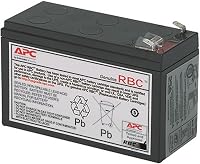
The BE600M1 uses APCRBC154, the BE850G2 uses RBC17, the BX1500M uses APCRBC124 and the BR1500MS2 uses APCRBC163. All four have user-replaceable batteries, sold separately.
Record the UPS model and matching cartridge number together. Don't assume a battery fits because its size or voltage looks similar.
For the BE425M, confirm service options for the exact model before buying parts. Its replacement path isn't established here.
Follow the manual's replacement process, including any required shutdown or disconnection. Don't assume replacement can happen while equipment remains powered.
Recycle spent lead-acid batteries through an appropriate collection service. Our APC replacement battery guide covers the swap, while the APC beeping guide helps identify alarms that need attention.
Common mistakes that lead to the wrong APC UPS
The biggest mistakes are sizing by outlet count and expecting full runtime at any load. Avoid them by separating your power limit, connection needs and shutdown time before choosing.
- Using every battery outlet because it's available. Each added device takes energy away from the equipment you most need to keep running.
- Backing up the PC but forgetting its screen. A running desktop is harder to shut down safely when you can't see the controls.
- Treating a UPS as a long-outage power station. These models suit short backup periods and planned shutdowns, not open-ended operation.
- Muting an alarm without identifying it. A warning can mean utility power is absent, the load is too high or the battery needs attention.
- Adding equipment without checking capacity again. A new computer or display can change the load enough to make the original choice unsuitable.
- Assuming surge protection guarantees no damage. It reduces exposure to certain power events but doesn't make connected equipment immune to every electrical fault.
If the UPS reports a wiring fault, have the outlet checked rather than treating the light as a battery problem. Changing the battery won't correct the building's wiring.
Should you compare APC with CyberPower before buying?
Compare specific models that meet the same needs if APC doesn't offer the combination you want. Match power limits, waveform, backup connections, runtime at your load and replacement options.
A brand name alone doesn't establish compatibility or useful backup time. A higher VA number also doesn't settle the choice when one model has fewer essential connections or the wrong output for your equipment.
The APC vs CyberPower comparison helps frame that decision. Use the CyberPower roundup to compare alternatives against the same requirements.
Choose the best APC UPS for your actual load
The best APC UPS is the one that meets your power and shutdown needs without forcing you to leave essential equipment unprotected. Choose the BR1500MS2 when pure sine wave output is required, or the BX1500M for a larger office setup whose equipment is compatible.
Choose the BE600M1 for a modest desktop after checking its draw. Move to the BE850G2 when several network or storage devices need battery connections, and choose the BE425M for a small group of low-power essentials.
Before ordering, write down 3 things: your combined load, essential plug count and required shutdown time. Then use the UPS battery backup buying guide if your needs extend beyond these five models.
Best APC UPS: your final check
Confirm the exact model, output requirements and placement before you connect the equipment. For a computer that needs pure sine wave, the pure sine wave guide is the next useful check.
Keep the manual with your equipment records and note the battery cartridge where applicable. That makes future alarms, maintenance and battery replacement easier to handle.
Our top 3 picks at a glance
-
1
Best for demanding PC setups
APC Back-UPS Pro BR1500MS2 1500VA Pure Sine Wave
8.7/10 our score
See it on Amazon -
2
-
3
Frequently asked questions
Which APC UPS is best for a home office?
The BR1500MS2 is the strongest choice here when your PC needs pure sine wave backup power. The BX1500M suits a larger office setup when its output meets your equipment's needs.
For a modest desktop or networking shelf, choose a smaller model after measuring the combined load and counting essential plugs.
Do APC UPS batteries need replacing?
Yes, UPS batteries lose capacity with age and use. The BE600M1, BE850G2, BX1500M and BR1500MS2 have user-replaceable batteries.
Match the cartridge to the exact UPS model, follow its manual and recycle the old battery properly.
A battery fault does not always mean the whole UPS needs replacement.
What does APC's pure sine wave model do?
The BR1500MS2 supplies a smooth AC waveform while running on battery. That matters when connected equipment calls for pure sine wave backup power.
Check your computer or power supply requirements before choosing.
Active PFC alone does not establish that every power supply needs the same UPS output type.
Will an APC UPS keep my internet working?
An APC UPS can keep your modem, router and other powered network devices running while its battery has charge. Your internet provider's equipment must also remain available.
Include any separate optical network terminal or required switch in your plan, since an unpowered device can break the connection.
How much UPS capacity should I leave unused?
Leave room above your measured working load for changes in demand and future equipment. A useful planning margin is about 20 to 30 percent, with more room for large swings.
Check both the watt and VA limits, then use runtime at your expected load to choose the final size.