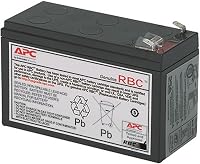
APC UPS Battery Replacement: How to Swap One
APC UPS battery replacement starts with matching your exact UPS model to its approved cartridge. Choose a replacement battery when the UPS still works properly and its backup capacity has faded.
On this page (8 sections)
- Which APC UPS battery replacement fits your model?
- Should you replace the battery or the whole UPS?
- What should you prepare before opening the battery compartment?
- How do you swap an APC UPS battery?
- How do you check the result after charging?
- How should you care for the replacement battery?
- How do you recycle the old APC battery?
- APC UPS battery replacement: make the final choice
APC UPS battery replacement starts with your exact UPS model and its approved cartridge. Replace the battery when backup time has faded but the UPS still works properly.
A fresh battery restores stored energy; it doesn't increase the UPS's power limit or repair faulty electronics. Before ordering, separate battery wear from an overload, a loose connection, or a change in the equipment you're powering.
Which APC UPS battery replacement fits your model?
Match the full model number to an approved cartridge, including the letters and numbers at the end. Similar names and the same VA capacity don't make 2 UPS units use the same battery.
Read the label on the UPS itself, then check its manual or APC's compatibility guidance. An old cartridge label is a useful cross-check, but don't rely on it alone if someone may have fitted a replacement before.
Choose from these cartridges only when your model is a confirmed match. They serve different UPS units, so a larger cartridge isn't an upgrade for a smaller one.
APC APCRBC154: replacement for BE600M1 setups
Choose APCRBC154 for a compatible BE600M1, BE670M1, BN650M1, or BN675M1. It suits someone keeping an otherwise working UPS in service after its battery capacity has declined.
This is a valve-regulated lead-acid cartridge designed for straightforward replacement. APC backs it with a 2-year manufacturer warranty.
Skip it if your model isn't a confirmed match, even if the old battery looks similar. It also won't solve a setup that now needs more output power than the existing UPS can supply.
APC RBC17: replacement for compatible desk setups
Choose RBC17 for a compatible BE650G1, BR700G, BE850G2, BE850M2, BX850M, or BN900M. It arrives fully assembled, which suits buyers who want to replace a complete cartridge rather than rebuild a battery pack.
APC describes the installation as tool-free and supports hot swapping. Still, use your UPS manual to decide the procedure, and plan a shutdown if you can pause the connected equipment.
Skip RBC17 if you're selecting it only because your UPS has a similar capacity. A cartridge intended for another model can have the wrong fit or connections.
APC APCRBC124: replacement for BX1500M setups
Choose APCRBC124 for a compatible BX1500M, BR1500G, or SMC1000-2UC. It suits an existing setup whose UPS still meets the load but needs its battery pack renewed.
The pack comes with new batteries installed and reusable packaging for a recycling return. APC backs the cartridge with a 2-year manufacturer warranty; check the return arrangements before assuming collection or shipping is included.
Skip it if you're trying to gain more runtime by fitting a different cartridge into another UPS. For help deciding whether to keep the same power capacity, use the UPS sizing guide.
APC APCRBC163: replacement for BR1500MS2 owners
Choose APCRBC163 for the compatible Back-UPS Pro BR1500MS2. It's the relevant option here for someone whose existing unit still serves their equipment but no longer holds enough charge.
APC backs this sealed lead-acid replacement cartridge with a 2-year manufacturer warranty. Confirm the full UPS model before ordering, especially when comparing units with similar model numbers.
Skip it for a different UPS unless APC confirms compatibility. Changing the battery doesn't change the UPS's output waveform, outlet layout, or power limit.
Should you replace the battery or the whole UPS?
Replace the battery when the UPS still meets your needs and the main problem is reduced backup time. Consider a new UPS when the case, outlets, or electronics have a fault, or your equipment has outgrown it.
First, compare your current load with what you powered before. Adding a computer, monitor, or other device can shorten runtime even when the battery hasn't failed.
An overload alarm calls for reducing the load or choosing a suitable UPS. A battery replacement cannot raise the unit's watt limit.
If an alarm prompted the replacement search, identify it first. The APC Back-UPS 600 beeping guide helps readers with that model separate alarm causes before buying parts.
Compare the cartridge cost with a suitable replacement UPS, then weigh the condition and features of your existing unit. Our best APC UPS guide helps when replacing the whole unit makes more sense.
What should you prepare before opening the battery compartment?
Prepare a planned shutdown, the correct cartridge, and your model's replacement instructions. Allow enough time for the swap and the charging period afterward.
Save your work and shut down computers or storage devices normally. Unplugging a UPS from the wall can make it switch to battery power, so that action alone doesn't make it inactive.
Turn off the UPS and disconnect wall power as its manual directs. Remember that the battery can still supply current inside the unit.
Use a clear, dry work surface with room for both cartridges. Remove rings and metal bracelets, keep tools away from exposed terminals, and have the gloves and eye protection recommended for handling the battery.
Inspect the replacement for damage and confirm that the cartridge you received is APC-branded. Don't fit a cracked, leaking, or otherwise damaged battery.
How do you swap an APC UPS battery?
Follow your model's battery-compartment procedure, using these steps as a planning checklist. Cover access, connector position, and cartridge orientation vary between UPS units.
- Shut down the connected equipment. Turn off and disconnect the UPS as directed in its manual.
- Open only the battery compartment. Don't remove panels that expose the UPS electronics.
- Note the connector position. A quick photo can help you preserve the correct orientation.
- Disconnect the old cartridge as instructed. Don't pull on wires or bridge terminals with a tool.
- Remove the cartridge with support underneath. Stop if it is stuck or swollen rather than forcing it out.
- Insert the replacement in the correct orientation. Make sure wires aren't trapped or pinched.
- Reconnect and close the compartment. Seat the approved connector fully without forcing it.
- Restore power and charge. Follow the manual before running the built-in battery check.
Don't improvise with adapters, loose wiring, or mixed old and new batteries inside a cartridge. A replacement that doesn't fit as instructed needs a compatibility check, not extra force.
How do you check the result after charging?
Charge for the period specified in your UPS manual, then run its built-in battery check. A partly charged replacement can give a poor first result.
If your model supports a battery replacement date or battery-status reset, follow its instructions. Don't clear warnings simply to hide a fault that remains.
Check that the UPS recognizes the battery and that no overload or battery fault remains. Models with runtime estimates may need time to show a useful estimate after charging.
If a warning persists, check the connector and model match with the unit shut down as directed. A fault that remains after the prescribed checks may need APC support or replacement of the UPS.
Avoid pulling wall power while important work is running to see how long the battery lasts. Use supported checks and shutdown settings, then read our guide to UPS runtime during an outage to set realistic expectations.
How should you care for the replacement battery?
Keep the UPS ventilated, avoid excess heat, and recharge after an outage. Leave clear space around its vents rather than enclosing it in a crowded cabinet.
Connect only the equipment that needs backup power. Extra devices consume the same stored energy and leave less time for a safe shutdown.
Repeatedly running the battery until the UPS turns off adds wear. Set up automatic shutdown where supported, especially for unattended computers or storage equipment.
Record the installation date and keep the receipt. If runtime starts falling later, compare it under a similar load rather than judging it after adding more devices.
The UPS battery lifespan guide explains how age, heat, and use affect the next replacement decision.
How do you recycle the old APC battery?
Take the old lead-acid cartridge to an accepted battery recycling service. Keep it out of household trash and ordinary curbside recycling.
Confirm that the service accepts UPS batteries before traveling or arranging a return. Follow its instructions for insulating terminals, packaging, and transport.
Keep the cartridge stable and protect its terminals from metal objects. If it is swollen, leaking, unusually hot, or smells of burning, stop handling it and seek guidance for a damaged battery.
APC UPS battery replacement: make the final choice
Buy the approved cartridge if your UPS is sound, still fits your load, and has lost battery capacity. Choose a new UPS if you need more power, different features, or a solution to a fault beyond the battery.
Match the exact model before ordering, schedule the shutdown, and allow a full charge before judging the result. The UPS battery backup buying guide covers the next decision if replacing the unit is the better route.
Frequently asked questions
How do I know which APC battery to buy?
Match your exact UPS model to the replacement cartridge APC approves for it; read the model label on the UPS, including any letters at the end, then check the manual or APC compatibility guidance. Don't choose by appearance, voltage, or the VA number alone.
Can I use a non-APC battery in an APC UPS?
APC recommends its own replacement cartridges for compatibility and performance; another brand needs to match more than voltage: the battery type, dimensions, terminals, wiring, and cartridge arrangement also matter. If you can't confirm that complete match for your exact UPS model, choose the approved APC cartridge.
How long does a new APC battery take to charge?
Use the charging time in your exact UPS model's manual; there isn't one charging period that applies to every APC unit, and an early self-check doesn't show fully charged performance. Leave the UPS connected to wall power as directed, then run its built-in battery check.