Why Is My APC Back-UPS 600 Beeping?
APC Back-UPS 600 beeping can signal battery operation, low charge, overload or a battery or unit fault. Match the sound and status lights to your exact model's manual before muting the alarm or buying a replacement.
On this page (9 sections)
- Why is my APC Back-UPS 600 beeping during an outage?
- Why does an APC Back-UPS 600 beep when power seems normal?
- What should you remove when an overload alarm sounds?
- How do you choose between a new battery and a bigger UPS?
- Which product fits your beeping problem?
- How should you set up and care for the UPS?
- How can you silence the alarm without missing a warning?
- When should you stop using a beeping UPS?
- APC Back-UPS 600 beeping: what should you choose?
APC Back-UPS 600 beeping means you should check the power source, connected load and battery status before deciding what to replace. The sound alone isn't enough to identify the cause.
Read the exact model number on the unit's label, then match its sound and lights to that model's manual. A “600” capacity label doesn't identify the battery cartridge or alarm controls.
Keep these details handy: whether utility power is available, which lights are on, whether the beep repeats or stays continuous, and what equipment is connected. They help separate a normal outage alarm from a problem that needs attention.
Why is my APC Back-UPS 600 beeping during an outage?
During an outage, an alarm can simply mean the UPS is supplying battery power. Save your work and prepare to shut down before its charge runs low.
Don't assign a meaning to a beep count from instructions for another APC model. Use the manual's alarm table, especially if the sound changes while the outage continues.
Keep only essential equipment running. A computer needs enough time for a clean shutdown, while a router and modem may be worth keeping powered longer.
Internet access still depends on your provider's equipment outside your home. Keeping your own network powered cannot guarantee that the connection stays available.
Runtime falls as the connected load rises, and battery condition also matters. The guide to how long a UPS lasts during an outage explains how to plan around your equipment.
Why does an APC Back-UPS 600 beep when power seems normal?
Beeping with the room lights on can indicate a brief power problem, excessive load, a battery warning or a fault. Don't assume a worn battery until you check the indicators.
A short interruption may pass before you notice it elsewhere. Check that the UPS plug is secure and note whether the alarm starts when another device switches on.
If the indicators point to the battery, check its connection using the manual's instructions. A disconnected battery and an aging battery call for different fixes.
Run the model's self-test only as instructed, with important work saved first. A failure needs follow-up, but it doesn't prove the cartridge is the only possible problem.
Battery age and a sharp drop in useful runtime support the case for replacement. The UPS battery life guide explains the care factors that affect that decision.
Why does my APC Back-UPS 600 keep beeping after a battery swap?
Continued beeping after a swap means you should check the cartridge, connection, charge and load before blaming the new battery. A replacement cannot correct an overload or a fault elsewhere in the UPS.
Confirm compatibility from the UPS model number and follow the installation instructions for the battery connection. Allow the required charging time before judging backup performance.
If the same warning returns after charging and reducing the load, use the manual's fault guidance or contact APC. Repeatedly buying cartridges is a poor response to an unresolved unit fault.
What should you remove when an overload alarm sounds?
Reduce the equipment on the battery outlets when the manual identifies an overload alarm. Save work first where possible, then disconnect nonessential devices.
Start with accessories that don't need outage power. A desk lamp or spare display may be less useful than the computer, main monitor and network connection.
Keep heaters, kettles and other high-demand appliances off a desktop UPS. Laser printers also have power demands that make them poor choices for small battery-backed outlets.
Don't assume moving a device to a surge-only outlet makes any load acceptable. Check the UPS manual and outlet limits, and use a suitable wall connection for equipment the manual excludes.
An outlet count isn't a power allowance. Several plugs may fit while their combined demand still exceeds the UPS's limit.
How do you choose between a new battery and a bigger UPS?
Choose a battery for lost backup capacity and a larger UPS for excessive equipment demand. Replacing the cartridge doesn't raise the power limit of the existing unit.
Add up the power needed by everything that must stay on during an outage. A plug-in power meter can help measure normal use and heavier work, rather than relying only on a computer power supply's label.
Check both the VA and watt limits, and leave room below them for changing demand. A system that runs close to the limit gives you little flexibility for added equipment.
For help sizing the whole setup, use the guide to choosing UPS size by VA, watts and runtime. Buy around the equipment you need to protect, rather than the largest number of sockets.
Which product fits your beeping problem?
The right choice depends on whether the existing UPS is worn, undersized or otherwise faulty. These options serve different needs, so diagnose the alarm before ordering.
APC BE600M1: for a modest desk or home network
Choose the BE600M1 for a small setup whose demand fits within 600VA and 330W. It suits buyers replacing a faulty compact unit without adding a much heavier load.
It also has 2 surge-only outlets and a 1.5A USB charging port that works during outages. APC gives a runtime of 23 minutes at a 100W load, which is a reference point rather than a promise for every setup.
Skip it if your equipment already overloads a healthy unit of this capacity. The APC BE600M1 review explains its fit for a small workstation in more detail.
APC APCRBC154: for a healthy BE600M1 with a worn battery
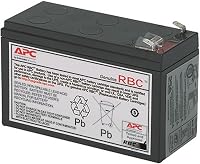
Choose the APCRBC154 when the BE600M1 still suits your equipment and the warning points to battery wear. This is a replacement cartridge, not a complete UPS.
APC identifies compatibility with the BE600M1, BE670M1, BN650M1 and BN675M1, and backs the cartridge with a 2-year warranty. Check the full model number before ordering.
Skip it if the UPS has physical damage, an unresolved internal fault or insufficient capacity. The APC battery replacement guide covers planning the swap.
APC BE850G2: for a workspace that needs more capacity
Choose the BE850G2 when your required load exceeds the smaller unit's capacity but fits within 850VA and 450W. It offers more room for essential equipment, subject to the combined demand.
It adds 3 surge-only outlets, 2 USB-A charging ports and a silenceable alarm. APC gives up to 35 minutes at a 100W load, making it worth considering when that reference load resembles yours.
Skip it if your load approaches its limit or you need long outage coverage. Its replacement battery is RBC17, so an APCRBC154 cartridge from the smaller unit isn't the right spare.
How should you set up and care for the UPS?
Put essential equipment on battery-backed outlets and give the UPS space to shed heat. Outlet labels matter because surge-only sockets stop supplying power during an outage.
For a desktop setup, include the monitor if you need it to save work and shut down. For internet backup, include each powered device in the connection path, such as the modem, router and separate fiber terminal.
Follow the manual for the initial battery connection and charging period. The BE600M1 has a stated charge time of 10 hours; the BE850G2 has a stated charge time of 8 hours.
Keep vents clear and place the unit in a dry spot away from heaters and direct sun. Don't bury it under papers or pack it into a closed cabinet.
Record battery installation dates and revisit the load when you add equipment. Recycle spent lead-acid batteries through an appropriate collection service rather than putting them in household trash.
How can you silence the alarm without missing a warning?
Use your model's mute instructions after identifying the alarm and taking the needed action. Don't assume every APC unit uses the same button press or supports the same mute options.
During an outage, save work before focusing on the sound. Muting cannot add runtime or prevent an abrupt shutdown when the charge runs out.
Don't disconnect the battery or cover the vents to quiet the unit. Check the status lights after muting so an ongoing warning doesn't disappear from your attention.
When should you stop using a beeping UPS?
Stop using the UPS if you notice swelling, leakage, smoke, a burning smell or unusual heat. Disconnect power only if it's safe, and avoid handling a damaged battery.
An unexplained fault that returns after the manual's checks also calls for APC support. Don't open the electronics enclosure or keep cycling the power to clear the warning.
Normal warmth alone doesn't establish a fault, so consider it alongside the manual's guidance and any change in behavior. Keep children and pets away from a damaged unit while arranging safe service or disposal.
APC Back-UPS 600 beeping: what should you choose?
Keep the existing unit if the alarm reflects normal battery operation and it still meets your needs. Plan a shutdown during outages rather than replacing working equipment to eliminate its warning sound.
Choose the APCRBC154 for a compatible, healthy unit with a worn battery. Choose the BE600M1 for a modest replacement setup, or the BE850G2 when measured demand calls for more capacity within its limits.
If neither complete unit fits your load or runtime goal, use the UPS battery backup buying guide to choose the next size.
Frequently asked questions
Why does my APC UPS beep when the power is fine?
Beeping while nearby lights stay on can mean a brief power interruption, an overload, a battery warning or a fault. Record the sound and indicator lights, then check your model's manual; a room light staying on doesn't prove that power at the UPS remained steady.
How do I stop the beeping on an APC UPS?
Find the cause before muting the alarm, using the sound and status lights together; save work if the unit is on battery, reduce an excessive load, or follow the battery warning instructions. Use only the mute method in your exact model's manual because alarm controls differ between units.
Should I unplug my APC UPS if it beeps?
A normal battery-operation alarm doesn't by itself mean you should unplug the UPS; save your work and check its status first. Stop using it if there's smoke, leaking, swelling, a burning smell or unusual heat; disconnect power only if you can do so safely, and don't handle a damaged battery.