Mini UPS for a Router: Is It Enough?
A mini UPS for a router is enough when its output voltage, polarity, connector and power limits match your network gear. Back up the modem or fiber terminal too if you need internet access during an outage.
On this page (8 sections)
- How to choose a mini UPS for a router
- Four mini and small UPS options for a router
- Which network devices need battery backup?
- How much router backup time should you plan for?
- How to connect and check a router mini UPS
- Common mistakes that shorten backup or cause failures
- How to care for a router backup battery
- Which mini UPS for a router should you choose?
A mini UPS for a router can keep compatible network gear powered through an outage. Choose by voltage, polarity, connector and load first, then check whether the battery can cover the time you need.
A DC mini UPS connects directly to the router's power input using a suitable cable. An AC UPS accepts the router's original wall adapter, which makes it easier to support devices with different power needs.
Our picks at a glance
-
1
 Best for several DC devices
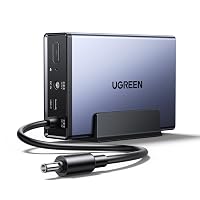
TalentCell Mini UPS 27000mAh Lithium Battery Pack
7.5/10 our score
See it on Amazon -
2
 Best for mixed connector needs
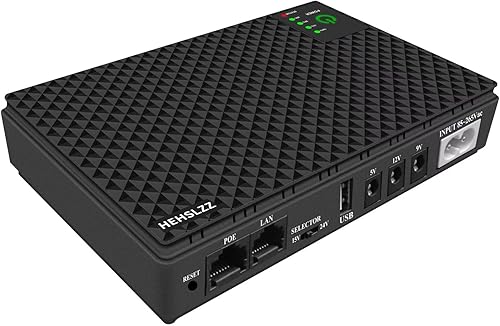
HEHSLZZ Mini UPS 10400mAh DC Battery Backup
7.0/10 our score
See it on Amazon -
3

- 4
 Best for keeping original adaptersCheck it
How to choose a mini UPS for a router
Choose a pack that matches every connected device, with enough output capacity for all of them together. A large battery cannot fix an incompatible power connection.
Mini UPS for router compatibility: check the whole connection
Read the output label on the original adapter and the power label on the router. Record the DC voltage, current in amps, barrel connector size and polarity symbol.
Voltage must match the device's requirement, while the UPS output must supply at least the required current. A higher available current does not force extra current into the router.
Multiply volts by amps to estimate an adapter's output capacity: 12V × 1A = 12W. This is a planning figure, not a measurement of what the router uses all day.
Check each port's limit and the UPS total limit separately. Several ports marked 2A do not mean you can draw 2A from all of them at once.
A barrel plug must have the correct outer diameter, inner diameter and polarity. Don't force a loose or tight connector, and don't assume an adapter tip changes voltage.
For a wider explanation of load and spare capacity, read how to size a UPS using watts and runtime.
Four mini and small UPS options for a router
Choose TalentCell for compatible DC gear with a larger battery, HEHSLZZ for connector flexibility, MEKOTRIN for limited space, or APC for original power adapters. The first three supply DC power; the APC supplies AC outlets.
TalentCell: for several compatible DC devices
The TalentCell has 97.2Wh of battery capacity, making it worth considering when a router and other low-power devices need backup. Its four nominal 12V outputs share space with a 9V output and USB connections.
The key restriction is voltage: those nominal 12V outputs range from 9V to 12.6V. Skip it for a device that requires a tightly regulated 12V supply unless the device manufacturer confirms compatibility.
TalentCell warns against continuously powering devices above 37W. Its DC connections use 5.5 x 2.1 mm plugs, so confirm both fit and electrical compatibility before choosing cables.
HEHSLZZ: for devices with different connector sizes
The HEHSLZZ suits buyers who need several connector options, with nine DC tips included. Its DC outputs support up to 2A per compatible output, subject to the 36W total limit.
PoE needs extra care here because HEHSLZZ describes both an updated gigabit version and an RJ45 port limited to 100Mbps. Confirm the exact version, voltage, Ethernet speed and PoE compatibility before connecting a camera or access point.
Skip it if you cannot confirm those details for a PoE device. A matching Ethernet socket alone does not establish power compatibility.
MEKOTRIN: for a small network shelf
The MEKOTRIN suits a low-power router in a tight space, with a body measuring 4.72 x 3.54 x 0.98 in. Its outputs include one 5V DC port, one 9V DC port, two 12V DC ports and one USB port.
Keep the combined load within its 24W maximum rather than treating each port as a separate power budget. MEKOTRIN claims up to 5 hours of runtime, with the result depending on the connected device.
Skip it for AC equipment or a setup whose load leaves no spare capacity. Multiple sockets give connection choices, not extra battery energy.
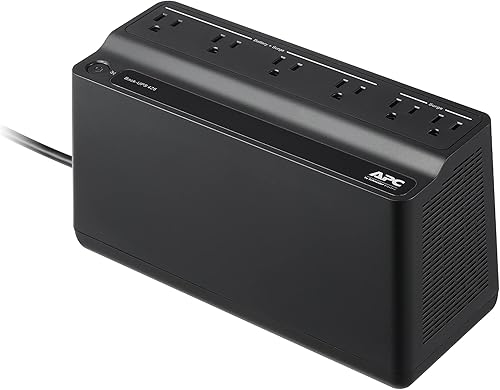
APC BE425M: for keeping the original power bricks
The APC BE425M is the simpler choice when your router and modem use different or unusual adapters. Keep those adapters and plug them into its battery-backed sockets.
It supplies 425VA / 255W, with four battery backup outlets and two surge-only outlets. Anything connected to a surge-only outlet loses power during an outage.
APC gives a runtime figure of up to 15 minutes at a 100W load; that does not establish runtime for your router. Skip it when shelf space favors a DC pack and all your devices already have compatible DC inputs.
Which network devices need battery backup?
Back up the whole path to your internet connection, not just the box that broadcasts Wi-Fi. Depending on your service, that may include a separate modem, fiber terminal or powered access point.
A router can continue broadcasting a network name while its upstream equipment is off. Your provider's equipment outside the home must also remain powered for internet access to continue.
For a two-box connection, compare UPS options for a router and modem. If you also need to protect stored files, see whether a NAS needs a UPS and UPS options for a NAS.
How much router backup time should you plan for?
Plan around your normal outage length and essential devices, then allow some battery reserve. Brief power cuts and several-hour outages call for different amounts of stored energy.
Watt-hours divided by watts gives an ideal runtime estimate. For example, a hypothetical 40Wh battery powering a 10W load gives 4 hours before conversion losses and battery cutoff.
Don't compare the packs by mAh alone. That figure depends on the battery voltage, which may differ from the output voltage supplied to your router.
Actual power draw also changes with connected equipment and activity. Adding a camera or charging a phone uses energy that would otherwise keep the network running.
Use our guide to UPS runtime during an outage to plan beyond the headline capacity.
How to connect and check a router mini UPS
Connect the UPS between its approved power supply and the router, following the unit's instructions. For an AC UPS, leave the router's adapter intact and use a battery-backed outlet.
- Charge the UPS as directed before relying on it.
- Confirm the selected output, polarity and cable before connecting each device.
- Start with the router, then add the modem or other essential gear.
- Disconnect the UPS from wall power briefly while leaving its device connections in place.
- Check the router lights and open a webpage over Wi-Fi with cellular data disabled.
- Restore wall power and confirm that the equipment stays connected.
If the router restarts, don't assume the battery is simply too small. Recheck the cable, output setting, load and compatibility before making another connection.
Run a longer check when you can tolerate losing the connection, and record the useful runtime. Repeat after changing equipment or if the battery starts providing noticeably shorter backup.
Common mistakes that shorten backup or cause failures
The biggest mistakes are powering the wrong devices and overlooking connection limits. Keep the battery focused on the equipment needed for internet access.
A splitter only shares an existing output. It does not raise the current limit, change voltage or make two incompatible devices safe to connect.
Don't plug a PoE output into an ordinary network device just because the cable fits. Confirm the required PoE method and use the designated powered port.
For AC units, avoid adding a desktop or monitor without recalculating load and runtime. Our home UPS buying guide covers setups that extend beyond network gear.
How to care for a router backup battery
Keep the UPS dry, ventilated and away from heat, with cables placed where they won't pull on its sockets. Don't bury it under papers or charge it on bedding or carpet.
Use the approved charger and let the battery recharge after an outage. Stop using a pack that swells, leaks, smells unusual or becomes excessively hot.
For long storage, follow the brand's charging directions rather than leaving the battery empty. TalentCell recommends charging its pack every 3 months during extended storage.
Which mini UPS for a router should you choose?
Choose a mini UPS for router backup only after every device passes the connection and power checks. Then choose capacity and size around the outage you need to cover.
- Pick TalentCell for its larger stated energy capacity if your gear accepts its output voltage range.
- Pick HEHSLZZ for its connector selection, with exact-version checks before using PoE.
- Pick MEKOTRIN for a modest DC setup where shelf space matters.
- Pick APC BE425M to keep original adapters and support equipment with different DC requirements.
If your connection uses a dish and its own power system, start with whether you need a UPS for Starlink before choosing a router pack.
Frequently asked questions
Is a mini UPS enough for a Wi-Fi router?
Yes, if its voltage, polarity, connector and output limits match the router, and its battery covers your outage needs. Internet access also requires power for your modem or fiber terminal; a working Wi-Fi signal alone doesn't mean your provider's connection is still available.
What does a mini UPS for a router need to match?
Match the router's required DC voltage, connector size and polarity, then check the current limit for that output. The UPS must also support the combined load of every attached device; a plug that fits physically can still carry the wrong voltage or polarity.
How long does a mini UPS keep a router running?
Runtime depends on usable battery energy and the total power draw of the connected equipment. Divide watt-hours by watts for an ideal estimate, then allow for conversion losses and battery cutoff; confirm the result with your own setup, since adapter labels usually show capacity rather than actual consumption.
Can I use a mini UPS for a modem and a router together?
Yes, if each device has a compatible output and their combined draw stays within the UPS limits. Check the current limit on each port as well as the total power limit; if either device needs an unsupported voltage or connector, an AC UPS lets you retain its original adapter.