5 Best UPS for a Router and Modem (October 2026)
The best router and modem UPS battery backups include the APC BE600M1 Back-UPS 600VA for everyday home networks, the APC BE850G2 Back-UPS 850VA for shared network shelves, and the CyberPower ST625U Standby UPS 625VA for simple desk networks.
On this page (11 sections)
- How we chose these router and modem backups
- Which devices need battery power?
- Best UPS for a router and modem, unit by unit
- How much UPS capacity does a home network need?
- How long will the router and modem stay online?
- How should you set up a router UPS?
- Where should the UPS sit in a small home or mesh network?
- Which common buying mistakes shorten useful backup time?
- How do you care for the battery?
- Is a mini DC UPS a better choice?
- Which router and modem UPS should you buy?
The best UPS for a router and modem is the APC BE600M1 for most basic home networks. Choose the BE850G2 when you want more room for shared gear or a longer runtime figure at the same load.
Keeping internet access alive takes more than powering the Wi-Fi router. Your modem, fiber terminal and any switch between you and the connection may also need battery power.
Start by counting those devices and deciding how long you need them to run. Then choose a unit that fits their plugs, power draw and location.
Our picks at a glance
-
1

-
2

-
3

- 4
 Best for network essentials onlyCheck it
 - 5
 Check it
CyberPower SL700U Standby UPS 700VA
Best for narrow installation spaces
How we chose these router and modem backups
We ranked these units by fit for a small home network, including battery outlets, placement, upkeep and available runtime figures. A higher power ceiling alone doesn't make a UPS a better router backup.
The BE600M1 leads because it balances a compact body with spare battery outlets and a replaceable battery. The BE850G2 moves ahead for buyers whose equipment or runtime needs justify its larger body.
The remaining picks solve narrower needs: a simple desk setup, essential devices alone or a slim installation space. Scores reflect those differences rather than promising a set number of minutes for every home.
Which devices need battery power?
Put every device required for your connection on a battery-backed outlet. A powered router cannot restore internet access through an unpowered modem or fiber terminal.
Walk through the path from your provider's cable to the device you use. A combined modem-router needs one power connection, while separate boxes each need their own.
A wired laptop connected through a switch also depends on that switch. A mesh satellite needs power if your room relies on it for coverage, even when the main router stays online.
Your provider's equipment beyond the home is outside your control. A UPS can keep your own network running, but it cannot guarantee that the provider's service survives the same outage.
Keep optional loads off the network battery
A TV, streaming box and decorative lamp usually don't help preserve internet access. Leave them off the battery-backed side so more stored energy remains for the connection.
Phone charging can be useful, but it also draws energy from the same battery. Charge only what you need during an outage rather than treating spare ports as free power.
| Product | Best for | Capacity | Battery outlets | Surge-only outlets | Our score |
|---|---|---|---|---|---|
| APC BE600M1 Back-UPS 600VA | everyday home networks | 600VA / 330W | 5 | 2 | 8.5 |
| APC BE850G2 Back-UPS 850VA | shared network shelves | 850VA / 450W | 6 | 3 | 8.4 |
| CyberPower ST625U Standby UPS 625VA | simple desk networks | 625VA | 4 | 4 | 7.4 |
| APC BE425M Back-UPS 425VA | network essentials only | 425VA / 255W | 4 | 2 | 7.2 |
| CyberPower SL700U Standby UPS 700VA | narrow installation spaces | 700VA / 370W | 5 | 3 | 7.1 |
Use the table to check capacity and outlet counts. Next, consider how each unit fits the devices and space you actually have.
Best UPS for a router and modem, unit by unit
The BE600M1 suits most small networks, while the other models fit different outlet, space and expansion needs. Choose by the job each unit will do in your home.
APC BE600M1 Back-UPS 600VA: Best for everyday home networks
- 600VA / 330W
- 7 outlets: 5 battery backup and 2 surge-only
- 1.5-amp USB charging port
- 490 J surge protection
- Replaceable battery (APCRBC154, sold separately)
The balanced choice for a modem, router and a few nearby network devices. Its replaceable battery makes it a practical unit to keep as your setup changes.
Pros
- Five battery outlets leave room for extra network gear
- APC gives 23 minutes at a 100W load
- User-replaceable battery
Cons
- No guaranteed runtime for your particular network
- Adding a desktop reduces the time available for internet access
Choose the BE600M1 for a modem, router and a few nearby accessories that should stay powered together. Its compact body works well when the network lives on a shelf or beside a desk.
APC gives 23 minutes at a 100W load, which provides a useful reference for comparing it with the other APC models here. Your own runtime depends on the total connected load and battery condition.
The spare battery outlets are useful for a small switch or another essential network box. Check the shape of each adapter, since a plug that covers its neighbor can reduce the number you can actually use.
The user-replaceable battery gives you a way to restore backup performance as it ages. Keep the replacement model information with your setup notes so future upkeep is simple.
Skip this pick if your main goal is keeping several shared devices running longer. The BE850G2 offers a stronger starting point for that job, provided its body fits the space.
APC BE850G2 Back-UPS 850VA: Best for shared network shelves
- 850VA / 450W
- 9 outlets: 6 battery backup and 3 surge-only
- 2 USB-A charging ports
- Silenceable alarm and LED indicators
- User-replaceable battery (RBC17, sold separately)
Choose this for a router, modem, switch and NAS sharing one location. APC's longer runtime figure at the same load also makes it worth considering for a network-only setup.
Pros
- Six battery outlets suit several essential devices
- APC gives up to 35 minutes at a 100W load
- Silenceable alarm
Cons
- Larger and heavier than the BE600M1
- A NAS or desktop uses part of the available battery time
Choose the BE850G2 for a shared network shelf with a modem, router, switch and NAS. It also deserves attention when your network is small but you value extra battery time over a smaller body.
APC gives up to 35 minutes at a 100W load, compared with the BE600M1's shorter figure at that same load. That comparison is more useful than choosing by VA alone.
Its silenceable alarm helps when the network shelf sits near a work area. Keep the status indicators visible so you can still notice a power or battery problem.
Adding a NAS changes the task from keeping internet access alive to protecting stored data too. Arrange a safe shutdown for the NAS rather than letting it run until the battery is empty.
Skip this model if shelf space is tight and you only need to bridge brief interruptions. If storage is the main load, best UPS for a NAS compares options around that need.
CyberPower ST625U Standby UPS 625VA: Best for simple desk networks
- 625VA standby UPS
- 8 outlets: 4 battery backup and 4 surge-only
- 2 USB charging ports, 2.1 amps shared
- Simulated sine wave output
- 3-year warranty including the battery
A compact option for a modem, router and a small number of essential accessories. Its even split of battery and surge-only outlets suits a desk with mixed power needs.
Pros
- Four battery outlets cover a basic network
- Separate surge-only outlets for nonessential accessories
- CyberPower includes the battery in its 3-year warranty
Cons
- Fewer battery outlets than the BE600M1
- Confirm runtime at your load before choosing it for a specific outage length
Choose the ST625U for a straightforward desk network with a few essential plugs and several accessories that only need surge protection. Its compact form keeps the backup close to the equipment without requiring a tower beside the desk.
The even split between battery-backed and surge-only outlets makes device assignment simple. Label the modem and router plugs so they don't get moved to the wrong side during cable cleanup.
CyberPower backs it with a 3-year warranty including the battery. That is useful coverage, though a warranty does not tell you how many minutes your particular equipment will run.
This is a standby model with simulated sine wave output. Follow any power requirements stated by your connected equipment, especially if you plan to add devices beyond basic networking.
Skip it if you need more battery-backed connections or have a firm runtime target that you cannot confirm for your load. Outlet count and duration are separate buying decisions.
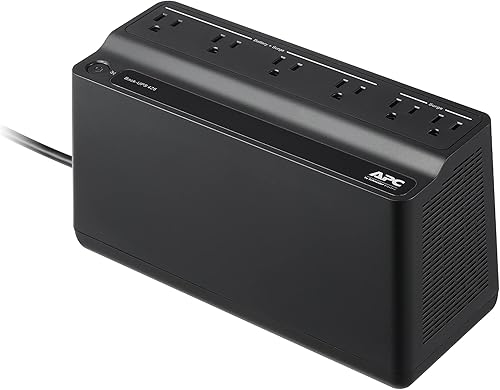
APC BE425M Back-UPS 425VA: Best for network essentials only
- 425VA / 255W
- 6 outlets: 4 battery backup and 2 surge-only
- Compact, wall-mountable body
- LED status indicators and audible alarms
- 3-year warranty
A focused choice for keeping the modem and router powered through brief interruptions. Wall mounting can free shelf space beside your network gear.
Pros
- Wall-mountable design
- Four battery outlets for essential devices
- APC backs it with a 3-year warranty
Cons
- APC's 100W runtime figure is shorter than both other APC picks
- Limited headroom for expanding into a shared computer setup
Choose the BE425M when the job is narrow: keep the modem and router powered through brief interruptions. Its wall-mountable body helps when the shelf already holds the network boxes and their adapters.
APC gives up to 15 minutes at a 100W load. A lighter load generally extends runtime, but this figure should not become a promise of hours for your setup.
This pick makes sense when you want the network on its own battery rather than sharing energy with a computer. Keeping those loads separate can preserve connection time while a laptop uses its own battery.
The lower capacity does not automatically rule out every computer. It does make this a less flexible choice for a growing workstation, so choose around the essential network devices first.
Skip the BE425M if you expect to add a NAS, several accessories or a longer outage target. The two higher-ranked APC models offer more room to plan around those needs.
CyberPower SL700U Standby UPS 700VA: Best for narrow installation spaces
- 700VA / 370W
- 8 outlets: 5 battery backup and 3 surge-only
- 2 USB charging ports, 2.4 amps shared
- Slim profile with wall-mounting slots
- 3-year warranty including the battery
Choose this when a slim body and wall-mounting options solve a placement problem. Two widely spaced outlets help accommodate larger power adapters.
Pros
- Slim body with keyhole mounting slots
- Two widely spaced outlets for larger plugs
- USB charging works on battery power
Cons
- Confirm runtime at your load before relying on a specific duration
- Simulated sine wave output requires a compatibility check for gear with special power needs
Choose the SL700U when the available space dictates the purchase. Its slim profile and keyhole mounting slots offer more placement options beside or behind a desk.
Two widely spaced outlets help with larger power adapters. Lay out your actual plugs before settling on a mounting position, since cable bends and access can require more room than the body alone.
The offset right-angle input plug can also help arrange the wall connection. Leave enough access to unplug the UPS without pulling on the cord or moving the whole network.
CyberPower confirms that its USB charging ports work on battery power. That is useful for a phone during an outage, although charging reduces the energy left for network equipment.
Skip this model if you need a specific duration and cannot confirm its runtime at your load. Buy it because its shape solves a real placement problem, then verify that its battery performance meets your goal.
How much UPS capacity does a home network need?
Choose a UPS with enough watts and VA for the whole connected load, then check runtime separately. These capacity limits tell you what it can support, not how long it will supply power.
A router and modem often use much less power than a desktop. Still, don't size your backup from a general assumption when your adapters and equipment can differ.
Choosing the best router and modem UPS size
Write down each essential device and its power needs. A plug-in power meter can give a more useful picture of actual AC draw than adding the maximum output printed on every adapter.
For example, an adapter marked 12V and 2A can supply up to 24W on its DC side. That does not mean the device constantly draws 24W, and the adapter itself has conversion losses.
Leave capacity headroom for normal changes in demand and planned additions. Running close to a UPS limit leaves little room for another switch, a different router or a shared computer.
If a switch powers other devices through Ethernet, include those devices in the load. Counting only the switch's own electronics can leave out much of the power it supplies.
For a clearer explanation of both limits, use what size UPS do I need?. Size the load first, then choose the battery duration you want.
How long will the router and modem stay online?
Runtime depends on load, battery condition and UPS design. Use a runtime chart for the exact model at a load close to yours rather than turning its VA number into minutes.
The APC figures in this guide share a 100W reference load, so they allow a useful comparison. They do not describe every router and modem combination.
A lighter load generally runs longer, but runtime does not scale in a simple straight line. Halving the watts does not guarantee exactly twice the duration because the UPS also uses energy.
Don't compare outlet count with battery size either. More places to connect equipment can help with a complex network while saying little about how long it will stay powered.
Set a useful target before shopping: bridge brief cuts, finish a call or keep a laptop connected while you save work. A firm multi-hour requirement needs more careful battery planning than a goal of avoiding router reboots.
Allow some margin beyond that target as the battery ages. For more on estimating duration, read how long a UPS lasts in a power outage.
How should you set up a router UPS?
Connect the UPS to a suitable grounded wall outlet and put essential devices on its battery-backed outlets. Follow the model's instructions for battery connection and initial charging before relying on backup power.
Don't daisy-chain it through another UPS, surge protector or power strip. Use the outlet arrangement the manufacturer permits, and keep the wall connection accessible.
Identify the battery-backed side before plugging anything in. Surge-only outlets can look similar, but they will not power the modem during a cut.
Label each adapter at the UPS end. A small tag marked “modem,” “router” or “fiber terminal” prevents confusion when one box needs to be restarted later.
Route cords without pulling them tight or covering vents. Leave room around adapters so a heavy plug doesn't strain its socket or become difficult to remove.
Confirm that the network stays connected
Use the manufacturer's instructions to check operation on battery during a quiet period. Keep essential calls and downloads out of that window, and avoid draining the battery fully just to find its limit.
Check more than the Wi-Fi icon on your phone. Turn off mobile data briefly and open a new webpage so cellular service cannot hide a lost home internet connection.
If Wi-Fi remains available but internet access stops, trace the connection back through the modem, fiber terminal and switch. One missed power adapter can break the whole path.
Afterward, restore normal power and allow the battery to recharge. A partly charged battery has less energy available for the next outage.
Where should the UPS sit in a small home or mesh network?
Place the UPS near the devices it must power, with clear airflow and access to its controls. A cool, dry, open location is better than a crowded cabinet that traps heat.
Measure space for the body, connected plugs and cord bends. A slim UPS can still need substantial clearance once large adapters are attached.
Use wall-mounting features only as directed, with suitable support for the unit's weight. Keep it away from places where a leak, spilled drink or foot traffic could damage it.
A mesh system needs a separate power plan for remote nodes. Backing up the main router does not keep a satellite across the house powered.
Decide which room must stay connected during an outage. You may only need the main router if you can work nearby, while a distant office may depend on its satellite.
A wired connection also needs every switch in its path. If the router shares a desk with a computer, best UPS for a home office covers the wider setup.
Which common buying mistakes shorten useful backup time?
The biggest mistake is adding nonessential loads to the battery side. A UPS chosen for networking can lose much of its useful duration when it also powers a desktop and monitor.
Another mistake is choosing by the largest VA number alone. Compare runtime at a similar load and check whether the extra outlets solve a need you actually have.
Don't assume a higher output limit means a bigger battery. Capacity and stored energy serve different roles, so both need attention.
Avoid choosing around outlet count without checking adapter fit. Two bulky plugs can block neighboring sockets and turn an adequate layout into an awkward one.
Don't expect a UPS to repair an internet service fault. It helps with local power interruptions, while cable damage, provider outages and network faults need a different solution.
Keep alarm and fault indicators within reach. Hiding the unit where you cannot see or hear it makes it easier to miss a battery warning.
How do you care for the battery?
Keep the UPS cool, ventilated and normally connected to utility power so its battery can remain ready. All five units use lead-acid batteries, which lose capacity with age and use.
Check status indicators periodically and follow the manufacturer's guidance for battery checks. Repeatedly running the battery empty adds wear without helping everyday readiness.
Record the installation date and any battery replacement date. Also note whether it still supports your required outage window, since a calendar alone cannot show remaining capacity.
For user-replaceable models, use the exact compatible battery and follow the replacement procedure. Don't assume that a battery that fits the compartment is electrically suitable.
A battery compartment can contain stored energy even when the UPS is unplugged. Avoid opening parts beyond those the instructions identify for user service.
Stop using a unit with a swollen, leaking or unusually hot battery. Keep the battery intact and take it to an appropriate recycling collection point rather than household trash.
Is a mini DC UPS a better choice?
A mini DC UPS can suit a small, fixed set of compatible devices, while an AC UPS is simpler for mixed adapters. The right choice depends on connections as much as battery size.
A DC unit may avoid converting battery power to AC and then back to DC through the router adapter. That can help efficiency, but actual runtime still depends on the complete design and load.
Match voltage, connector size, polarity and output capacity before connecting anything. A plug that slides into the socket does not prove compatibility.
Separate router and modem boxes may require different outputs. Also check whether the backup can power all required devices at once, rather than just one of them.
An AC UPS lets you retain the original power adapters, though you still need suitable input voltage and outlets. Read mini UPS for a router for that choice, or do you need a UPS for a NAS when storage shares the backup.
Which router and modem UPS should you buy?
Choose the BE600M1 for a basic home network with a few spare connections. Move to the BE850G2 when a shared shelf or a longer runtime goal makes the larger unit worthwhile.
Pick the ST625U for a simple desk network, the BE425M for essential devices alone or the SL700U when a narrow space controls the choice. Confirm plug fit and runtime before committing to any of them.
The best UPS for your router and modem is the one that powers the entire connection for your required window. Count the necessary boxes, measure the load and leave optional devices off the battery.
For a dish and router setup, read do you need a UPS for Starlink. For planning beyond the network, use the UPS battery backup buying guide.
Our top 3 picks at a glance
-
1
-
2
-
3
Frequently asked questions
Do I need a UPS for a router and modem?
A UPS is useful if brief power cuts interrupt calls, remote work or connected devices; it keeps your local network powered while battery energy remains, but your internet provider must also stay online. Include any separately powered fiber terminal or network switch needed for your connection.
How long will a small UPS keep my router running?
Runtime depends on the combined load, battery condition and UPS design; APC gives 23 minutes at 100W for the BE600M1 and up to 35 minutes at that load for the BE850G2. A lighter network load generally lasts longer, but use a model-specific runtime chart to plan.
Should a router UPS have battery outlets for the modem?
Yes, both the router and modem need battery-backed outlets to keep internet access working during a power cut; include a separate fiber terminal if your service uses one. Surge-only outlets stop supplying power during an outage, so they cannot keep any required part of that connection running.
Is a mini UPS enough for a router and modem?
A mini DC UPS can work if its voltage, polarity, connector and output capacity match every device you want to power; separate router and modem boxes may need different outputs. An AC UPS lets you keep their original power adapters, which usually makes mixed-device setups simpler to arrange.


