Do You Need a UPS for a NAS?
A UPS for a NAS gives it time to shut down cleanly during a power cut. Choose one that supports your NAS's shutdown controls and covers the total load you need to keep running.
On this page (8 sections)
- Do you need a UPS for a NAS?
- Four UPS options for a NAS
- Should you choose an AC UPS or a DC pack?
- How much power and runtime does your NAS need?
- How do you set up automatic NAS shutdown?
- Which mistakes shorten protection or cause shutdown trouble?
- How do you care for a NAS UPS?
- Which UPS should you buy for your NAS?
A UPS for a NAS is worth adding when you want power cuts to trigger an orderly shutdown instead of an abrupt stop. Choose shutdown support first, then enough battery capacity for the NAS and any network gear that must stay on.
The goal is to protect work in progress, such as file transfers and database writes. A UPS does not replace a separate backup of your files.
Our picks at a glance
-
1

-
2

-
3
 Best for dedicated UGREEN setups
UGREEN NAS UPS US3000 120W DC Battery Backup
7.8/10 our score
See it on Amazon
- 4Check it
UGREEN NAS UPS US2000 72W DC Battery Backup
Best for tight UGREEN shelves
Do you need a UPS for a NAS?
Yes, for most always-on home NAS setups. The benefit is greatest when the NAS accepts backups, syncs files or runs services while you're away and cannot shut it down yourself.
An interrupted write can leave a file incomplete or require recovery work when the NAS restarts. Battery power gives the system a chance to stop tasks and shut down in order.
A NAS holding only replaceable copies has less at stake, but still benefits from controlled shutdowns. RAID helps with certain drive failures; it does not supply power during an outage.
Choose a UPS for NAS shutdown support first
Confirm that the NAS can detect an outage and act on it. A battery can keep the box powered briefly, but without a shutdown trigger it may simply delay the abrupt stop until the battery empties.
Check your NAS maker's compatibility guidance for the exact UPS model and connection method. Do not assume that a USB charging port also carries UPS status information.
Four UPS options for a NAS
Choose an AC unit for shared equipment, or a compatible UGREEN pack for a dedicated NAS. The deciding factors are your exact NAS model, shutdown controls and the devices sharing backup power.
The APC BE600M1 suits a small home network where the NAS, router and modem are the main priorities. APC gives a runtime figure of 23 minutes at a 100-watt load, which provides a useful comparison point rather than a promise for your setup.
Its 330-watt output limit must cover everything connected to battery outlets. Skip it for a shared workstation if that combined demand leaves little room for heavier activity or future additions.
The battery can be replaced with an APCRBC154 cartridge. Before buying, confirm shutdown communication with your NAS; its phone-charging feature does not answer that question.
The APC BE850G2 suits a shared desk with a NAS and computer that both need backup power. Its 450-watt output and six battery outlets give that setup more room than the smaller APC.
APC quotes up to 35 minutes at a 100-watt load. Adding a busy computer changes the load, so do not plan around that figure without checking the runtime curve for your combined equipment.
Skip the larger unit if your NAS and essential network gear are already well within the smaller model's limits and runtime needs. Its user-replaceable battery takes an RBC17 cartridge.
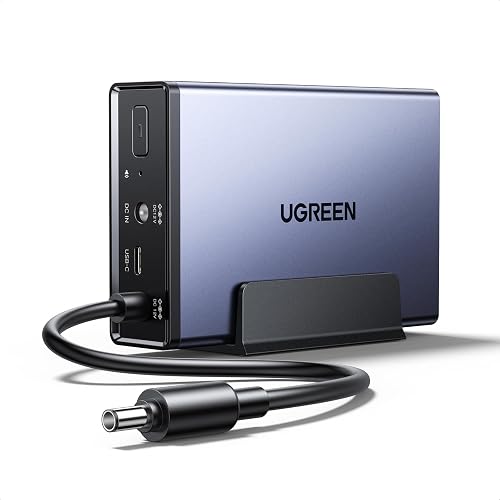
The UGREEN US3000 suits a compatible NAS that needs its own backup pack rather than shared AC outlets. UGREEN says it adds about 10 minutes of operation during an outage, with actual needs depending on the NAS and its activity.
App policies can pause active tasks or send a notice to shut down, and UGREEN supports automatic restart when power returns. A notice still requires action, so check which behavior your chosen policy provides.
Skip it for other NAS brands or an unsupported UGREEN model. The DXP6800 and DXP8800 series are excluded, and a similar model name is not enough to establish compatibility.
The UGREEN US2000 suits a supported NAS on a crowded shelf. Its body measures 4.72 x 3.15 x 0.98 inches, making placement a clear reason to choose it.
Compatibility is limited to the DH2300, DH4300 Plus, DXP2800 and DXP2800 GT. Its app policies cover task pausing or shutdown notices, with automatic restart supported when power returns.
Skip it if your model is absent from that list or you also need to power a router and modem. Do not turn its battery capacity into a runtime estimate without a figure for your NAS model and workload.
Should you choose an AC UPS or a DC pack?
An AC UPS is the flexible choice for a NAS plus network gear. It supplies the NAS through its normal power adapter, while a DC pack must match the supported device and its power connection.
For a DC pack, follow the connection sequence in its manual. Matching a plug's shape alone does not confirm the correct voltage, polarity or device support.
Keeping the network powered matters if outage notices or remote access depend on it. For the router side of the same shelf, read best UPS for a router and modem.
A router-sized battery is a different buying decision. See mini UPS for a router before assuming a small DC backup can also power your NAS.
How much power and runtime does your NAS need?
Size the UPS for the combined load and the time needed to shut down. Watts tell you whether it can supply the equipment; runtime tells you how long that equipment can remain on battery.
A NAS power adapter's wattage is its supply capacity, not a measurement of normal consumption. Use NAS power guidance or a suitable plug-in power meter, and account for heavier activity such as drive startup and file work.
Add every device you plan to keep on battery. Leave output headroom instead of choosing a UPS whose limit barely matches the total.
Then compare runtime at that load, allowing time for both the shutdown delay and the shutdown itself. For worked sizing guidance, read what size UPS you need.
Battery capacity in mAh cannot directly compare these DC packs with an AC UPS. Voltage, conversion losses and workload affect usable runtime.
How do you set up automatic NAS shutdown?
Configure shutdown while utility power is available, then verify the whole sequence. Connecting power alone does not establish that the NAS will recognize an outage.
- Charge the UPS as its manual directs before relying on it.
- Put the NAS and essential network gear on battery-backed connections.
- Connect any required data cable and confirm that the NAS recognizes the UPS.
- Set a shutdown delay or supported battery threshold that leaves a reserve.
- Choose the recovery behavior for when stable power returns.
For an app-based pack, distinguish automatic task pausing from a shutdown notice. An alert on your phone is not the same as a completed shutdown while you're asleep.
Verify operation during a quiet maintenance window after current backups are complete. Follow the manufacturer's outage simulation procedure and watch for detection, orderly shutdown and the chosen restart behavior.
Avoid scheduling shutdown at the last possible moment. An older battery or an unexpectedly busy NAS may leave less time than you planned.
Which mistakes shorten protection or cause shutdown trouble?
The biggest mistakes are using the wrong outlets, ignoring communication and adding unnecessary load. Label the connections so routine cable changes do not undo the setup.
Surge-only outlets do not provide battery power. A NAS plugged into one will lose power during an outage even if unused battery outlets remain available.
Keep high-draw devices such as heaters and laser printers off the battery outlets. Also avoid adding a computer later without checking the combined load again.
Do not wait for a phone alert if your goal is unattended protection. Configure the strongest supported automatic action, and make sure any needed network path stays powered.
A separate backup remains essential. A UPS cannot recover a deleted folder or protect files if the NAS itself fails.
How do you care for a NAS UPS?
Keep it ventilated and respond to battery warnings before runtime becomes too short. Place the unit away from heat, moisture and blocked vents, with room to reach its controls and cables.
Use the maker's battery health check where available and review outage logs after power problems. Repeated low-battery warnings deserve attention even when the NAS appears to restart normally.
For replaceable batteries, follow the exact model's service instructions and use the specified replacement. Do not open a sealed pack or assume all models allow the same replacement procedure.
Stop using equipment with swelling, leakage or abnormal heat, and arrange proper battery recycling. Our guide to how long a UPS battery lasts explains the signs of aging.
Which UPS should you buy for your NAS?
Choose the BE600M1 for a small essential network, or the BE850G2 when a computer shares backup power. Confirm shutdown support and check combined demand before settling on either AC unit.
For a supported UGREEN NAS, choose the US3000 when its model support and app policies fit your needs. Choose the US2000 when your NAS is on its shorter compatibility list and shelf space matters.
Your final rule for a UPS for NAS protection is simple: supported shutdown control, enough output, then enough runtime with a reserve. Compare more choices in best UPS for a NAS.
The UPS battery backup buying guide covers the basics for the rest of the desk.
Frequently asked questions
Do I need a UPS for a NAS at home?
A UPS is a sensible addition if your NAS stores files or runs tasks you don't want interrupted by a power cut. It provides a window for an orderly shutdown, provided the shutdown controls are configured; keep separate backups too, since battery power cannot protect against deletion, theft or drive failure.
Do I need a long runtime for a NAS?
You need enough runtime to cover the shutdown delay and let the NAS finish shutting down, with a reserve for battery aging. Longer runtime helps if you want to ride through brief outages, but it should not come at the expense of reliable shutdown communication or enough output capacity.
Can a NAS use a UPS over USB?
Many NAS systems support UPS status signals over a USB data connection, but support depends on the exact NAS and UPS combination. Check the NAS compatibility guidance and confirm that its settings recognize the unit; a USB port meant for charging a phone does not establish support for shutdown communication.
Are the UGREEN NAS UPS packs compatible with every NAS?
No, both packs support specific UGREEN models rather than NAS devices in general. The US3000 excludes the DXP6800 and DXP8800 series, while the US2000 supports only DH2300, DH4300 Plus, DXP2800 and DXP2800 GT; match the full model name, including suffixes, before choosing a pack.


