5 Best UPS for a Home Office (October 2026)
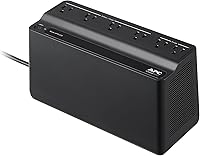
The best home office UPS battery backups include the CyberPower CP1500PFCLCD 1500VA Pure Sine Wave UPS for demanding desktop setups, the APC BX1500M 1500VA Back-UPS Pro for monitoring desk power, and the APC BE600M1 Back-UPS 600VA for light office setups.
On this page (11 sections)
- How we chose these home office UPS options
- How the home office UPS units compare
- Which UPS fits each home office setup?
- How to size a UPS for home office equipment
- How much outage runtime should you plan for?
- Do you need pure sine wave output at your desk?
- Which devices should get battery outlets?
- How to set up a home office UPS
- How to care for the battery and handle alerts
- Common mistakes that shorten useful backup time
- Which UPS should you buy for your home office?
The best UPS for home office use is the CyberPower CP1500PFCLCD for a desktop workstation, while lighter setups can use a smaller unit sized to their actual load. Choose enough battery outlets for the devices that must stay on together.
A UPS gives you time to save work, close applications and shut down during an outage. It can also keep local network equipment powered, though your internet connection still depends on service outside your home.
Start with a clear goal: finish a short task, keep a call going or shut down safely. That goal matters more than buying the largest VA number you can find.
Our picks at a glance
-
1
 Best for demanding desktop setups
CyberPower CP1500PFCLCD 1500VA Pure Sine Wave UPS
8.9/10 our score
See it on Amazon -
2

-
3

- 4
 Best for several small devicesCheck it
 - 5
 Check it
CyberPower CP1500AVRLCD3 1500VA Intelligent LCD UPS
Best for compatible multi-device desks
How we chose these home office UPS options
We compared watt capacity, battery outlets, output type and useful controls to match each UPS to a different desk setup. A large workstation and a laptop-centered office need different amounts of backup power.
Capacity decides how much equipment you can connect, while runtime decides how long it can stay on. A model can support your desk's load yet provide only a short shutdown window at that load.
We also considered maintenance and placement. A battery you can replace, a readable display and a body that fits safely near your desk all affect daily use.
For equipment limited to a modem and router, see our best UPS for a router and modem. You may not need a desktop-sized unit for that smaller job.
How the home office UPS units compare
Compare capacity and battery outlets first, then choose the controls and output type your equipment needs. A spare surge-only outlet cannot replace a battery outlet during a blackout.
| Product | Best for | Capacity | Battery outlets | Status display | Our score |
|---|---|---|---|---|---|
| CyberPower CP1500PFCLCD 1500VA Pure Sine Wave UPS | demanding desktop setups | 1500VA / 1000W | 6 | Tilting color LCD | 8.9 |
| APC BX1500M 1500VA Back-UPS Pro | monitoring desk power | 1500VA / 900W | 5 | LCD | 8.5 |
| APC BE600M1 Back-UPS 600VA | light office setups | 600VA / 330W | 5 | LED indicators | 8.5 |
| APC BE850G2 Back-UPS 850VA | several small devices | 850VA / 450W | 6 | LED indicators | 8.4 |
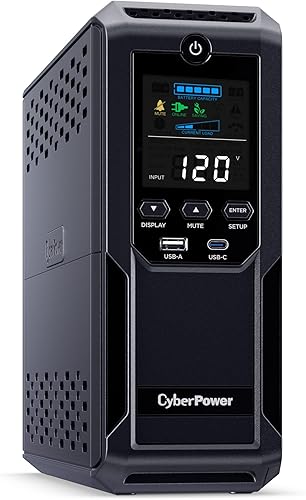
| CyberPower CP1500AVRLCD3 1500VA Intelligent LCD UPS | compatible multi-device desks | 1500VA / 900W | 6 | Color LCD | 8.3 |
The number of sockets is only part of the fit. Large power adapters can block nearby sockets, so consider the shape of your plugs as well as the count.
Which UPS fits each home office setup?
Choose the model that covers your essential equipment and shutdown plan. The product sections below explain where each fits and when to move to another option.
CyberPower CP1500PFCLCD 1500VA Pure Sine Wave UPS: Best for demanding desktop setups
- 1500VA / 1000W pure sine wave output
- 6 battery backup outlets and 6 surge-only outlets
- Color LCD that tilts up to 22 degrees
- USB-A and USB-C charging ports
- Automatic voltage regulation
Choose this for a desktop workstation that needs pure sine wave output and room for several essential devices. Its higher watt limit gives you more load capacity than the other picks.
Pros
- Supports active PFC and conventional power supplies
- Highest watt capacity in this group
- Tilting display helps when placed below a desk
Cons
- Weighs 24.9 pounds
- More capacity than a light network-only setup needs
The CP1500PFCLCD suits a demanding desktop setup where power supply compatibility is a priority. Its 1500VA / 1000W capacity gives it the highest watt ceiling among these five, and its pure sine wave output supports active PFC and conventional power supplies.
Choose it for a workstation that shares backup power with a monitor, network gear and external storage, after adding their loads. The extra capacity is useful when your desktop draws more power during rendering or other heavy work.
Automatic voltage regulation corrects minor voltage changes without switching to battery. That makes it a useful feature when brief dips happen even though the electricity never fully goes out.
The tilting screen helps if the unit sits below your desk, but plan its location before moving the 24.9-pound body. CyberPower backs it with a 3-year warranty including the battery.
Skip it if your only goal is keeping a router powered or supporting a light laptop setup. Those jobs may be better served by a smaller unit with a suitable runtime curve.
APC BX1500M 1500VA Back-UPS Pro: Best for monitoring desk power
- 1500VA / 900W
- 5 battery backup outlets and 5 surge-only outlets
- Automatic voltage regulation
- LCD shows charge, estimated runtime, load and input voltage
- Coaxial and Ethernet surge protection
A useful choice when you want to see your desk's load and estimated remaining runtime. Its display helps you judge when to save work and shut down.
Pros
- Displays load and estimated runtime
- Corrects high and low voltage without using the battery
- User-replaceable APCRBC124 battery
Cons
- One fewer battery outlet than the six-outlet picks
- Replacement battery is sold separately
The BX1500M suits a desktop user who wants clear load and runtime information while deciding when to shut down. Its LCD shows battery charge, estimated runtime, load capacity and input voltage.
That information helps when your workload changes through the day. Treat the remaining-time display as a planning aid, and save work early rather than waiting for its final minutes.
Its 1500VA / 900W capacity gives room for a desktop and supporting gear when their total stays within the limits. Automatic voltage regulation handles high and low input voltage without repeatedly drawing on the battery.
APC gives about 68 minutes at a 100W load; that figure does not describe a busy workstation. Compare your measured draw with the runtime curve before expecting a long working window.
Choose another model if six separate devices need battery outlets, since this one provides five. If your equipment requires pure sine wave output, choose an option that explicitly provides it.
Our APC BX1500M review covers this model in more detail.
APC BE600M1 Back-UPS 600VA: Best for light office setups
- 600VA / 330W
- 5 battery backup outlets and 2 surge-only outlets
- 1.5A USB charging port
- Audible alarms and LED indicators
- User-replaceable APCRBC154 battery
A compact choice for a modest desktop or a laptop-centered office with network gear. Check the combined load before adding monitors, docks or storage.
Pros
- Compact body weighs 7.5 pounds
- USB charging works during outages
- Battery can be replaced without replacing the whole unit
Cons
- Lowest watt limit in this group
- LED indicators provide less detail than an LCD
The BE600M1 fits a light office setup where modest power needs and compact size matter more than a detailed screen. Its 600VA / 330W capacity requires a closer load check than the larger towers.
A laptop-centered desk is a sensible use: the laptop has its own battery, while the UPS can support the router, modem, external display or dock. Include the laptop charger if you plan to keep it connected during an outage.
APC gives 23 minutes at a 100W load. Use that as a reference point, not a promise for every combination of devices.
Its body measures about 10.79 x 4.13 x 5.47 inches, making it easier to place near a small desk. Leave space for plugs and ventilation rather than choosing a spot from those dimensions alone.
Skip it for a high-draw workstation or a desk with uncertain power needs. The user-replaceable battery uses the APCRBC154 cartridge, sold separately.
Read our APC BE600M1 review for a closer look at this compact option.
APC BE850G2 Back-UPS 850VA: Best for several small devices
- 850VA / 450W
- 6 battery backup outlets and 3 surge-only outlets
- 2 USB-A charging ports
- Silenceable alarm and LED indicators
- User-replaceable RBC17 battery
Choose this when several lower-power devices need backup together, such as a modest PC, monitor, modem, router and storage device. Count their combined watts before filling the outlets.
Pros
- Six battery outlets for separate power adapters
- Alarm can be silenced
- Wiring Fault Indicator LED
Cons
- Less watt capacity than the larger tower units
- No LCD for viewing load or runtime
The BE850G2 suits a desk with several lower-power devices that all need to survive the same interruption. Its six battery outlets can serve separate adapters for a modest computer, display, router, modem and storage device.
The 850VA / 450W capacity is the limit for that combined load, regardless of how many sockets remain open. Choose it for outlet flexibility after confirming the watts, rather than assuming six devices will always fit.
APC gives up to 35 minutes at a 100W load. A heavier desktop load leaves less time, so decide whether you need continued work or just a safe shutdown.
The silenceable alarm is useful near a desk, but keep the LED indicators visible so you can still notice status changes. Silencing an alert should follow checking its cause.
Skip this model if you need an LCD to watch load and runtime or need more workstation capacity. Its user-replaceable battery takes the RBC17 cartridge, sold separately.
CyberPower CP1500AVRLCD3 1500VA Intelligent LCD UPS: Best for compatible multi-device desks
- 1500VA / 900W simulated sine wave output
- 6 battery backup outlets and 6 surge-only outlets
- Color LCD panel
- USB-A and USB-C charging ports
- Automatic voltage regulation
A fit for a desk with several devices whose power supplies accept simulated sine wave output. It combines a larger watt allowance with six battery outlets.
Pros
- Six battery outlets plus six surge-only outlets
- Color display shows battery and power conditions
- CyberPower includes downloadable PowerPanel Personal software
Cons
- Unsuitable when equipment requires pure sine wave output
- At 23.8 pounds, it needs a sturdy location
The CP1500AVRLCD3 suits a multi-device desk whose equipment accepts simulated sine wave output. Its 1500VA / 900W capacity and six battery outlets accommodate a larger combined load than the compact APC options.
Choose it when you have already checked power supply compatibility and need both battery outlets and spare surge-only connections. The color LCD shows battery and power conditions, while automatic voltage regulation handles minor fluctuations without using battery power.
The USB-A and USB-C charging ports can support portable devices without occupying an AC socket. Charging extras during an outage still uses stored energy, so prioritize work equipment when runtime is short.
CyberPower includes downloadable PowerPanel Personal software and a 3-year warranty including the battery. Check software support for your operating system before building an automatic shutdown plan around it.
Skip this model when a connected device requires pure sine wave output. The CP1500PFCLCD is the clearer choice in that case, rather than choosing this one only because both carry a 1500VA label.
How to size a UPS for home office equipment
Size your UPS from the combined draw of everything that needs backup, with room below its limits. Both the watt and VA limits matter, so the connected equipment must stay within each.
Measure your home office UPS load during real work
A plug-in power meter can show your equipment's draw at the wall. Measure during a demanding normal task, not only while the computer sits idle.
A desktop power supply's label shows its rated output capacity, not the computer's constant wall draw. A 750W power supply does not mean the PC always consumes 750W.
Include the monitor, modem, router, dock and external storage that will share backup power. Keep a short device list so a later upgrade does not quietly push the setup too close to capacity.
For example, a hypothetical desk drawing 240W has only 90W below a 330W ceiling. That margin must cover workload changes and anything else you add, and it says nothing about outage runtime.
Our guide to what size UPS you need explains how VA, watts and runtime fit together.
How much outage runtime should you plan for?
Plan for the task you need to finish and an orderly shutdown, with reserve left over. A small UPS is usually a bridge through an interruption, not a way to work through an afternoon blackout.
For document work, that may mean saving files and closing applications. For a long file transfer or storage task, your shutdown plan needs to account for the devices involved.
Read runtime figures at your expected load. A figure measured at 100W cannot be applied to a desk drawing several times that amount.
Runtime also does not fall in a simple straight line as load rises. Use the manufacturer's curve rather than dividing a low-load figure by your load multiplier.
Battery age, temperature and incomplete charging can reduce the time available. After one outage, a second interruption may arrive before the battery has recovered.
For a fuller explanation, see how long a UPS lasts during an outage. Decide your shutdown point before the power fails.
Do you need pure sine wave output at your desk?
Choose pure sine wave output when your equipment requires it, and check compatibility before buying a simulated sine wave model. Active PFC alone is not a reason to assume every power supply has identical requirements.
The CP1500PFCLCD is the explicit pure sine wave choice here. The CP1500AVRLCD3 uses simulated sine wave output.
Output shape and capacity solve different problems. A higher watt limit does not settle compatibility, and pure sine wave output does not mean a smaller unit can carry an oversized load.
If the computer's manual is unclear, ask its manufacturer about battery-backup requirements. That matters more than assuming two UPS units behave alike because their model names look similar.
Which devices should get battery outlets?
Give battery outlets to the devices needed to keep working or shut down safely. Usually that means the desktop, at least one monitor and the network gear your work depends on.
A second monitor can be optional if one screen is enough to save and close your work. Speakers, decorative lights and other nonessential accessories should not consume your outage reserve.
A NAS needs more than an available socket. If it must shut down automatically, confirm that the NAS and UPS support a compatible communication method before buying.
Read our guide to choosing a UPS for a NAS when storage protection is part of the plan. Power alone cannot tell the NAS when the battery is nearly empty.
Keep the whole internet path powered
A router can remain on while the modem loses power, leaving Wi-Fi available without internet access. Include any separate modem, fiber terminal or network switch needed between your computer and the incoming connection.
Even with all local equipment powered, an outage affecting your provider can stop service. Keep a separate connection plan if a missed call or interrupted remote session would cause a serious problem.
Keep high-draw equipment separate
Keep laser printers, heaters and similar high-demand equipment off battery outlets. A laser printer's warm-up demand can overwhelm a UPS that comfortably supports your computer.
Do not assume a surge-only socket makes every appliance suitable. Follow both manuals and their connection limits, using a separate connection where required.
A surge protector handles a different job from battery backup. Our UPS vs surge protector guide explains which protection you need for each device.
How to set up a home office UPS
Set up the UPS before you rely on it, including charging, outlet checks and any shutdown software. A new unit may need a battery connection step before normal use.
Follow the manual for connecting the battery and completing the initial charge. Do not assume it arrives ready to deliver its full runtime.
Connect the UPS directly to a suitable grounded wall outlet as instructed. Avoid extension cords, chained power strips and connections through another UPS.
Place it on a firm surface with ventilation space around its vents. Keep it away from heaters, direct sun, damp areas and spots where a spill could reach it.
Route cables so they cannot pull the unit over or catch your feet. Leave access to the controls and enough room to remove plugs without shifting heavy furniture.
Label each essential device's cord and confirm it uses a battery outlet. A monitor connected to surge-only power can leave a running desktop without a usable screen during a blackout.
Arrange automatic shutdown before an outage
Use compatible monitoring software if the desktop may be running while you are away. A USB charging port is not the same as a communication connection for shutdown control.
Follow the software instructions to set a shutdown condition that leaves adequate reserve. Account for open applications, storage devices and any work that may delay the process.
Use the manual's supported self-check procedure after setup. Recheck the configuration after moving equipment, changing the operating system or adding a new device.
How to care for the battery and handle alerts
Keep the UPS cool, ventilated and charged, and respond to battery warnings promptly. Battery capacity falls with age, even when outages are rare.
Record the installation date and replacement battery model. Keep that information with the manual so maintenance does not depend on reading a label behind the desk.
Review status indicators occasionally and after an outage. Do not wait for an unexpected shutdown to notice that the battery needs attention.
An alarm can mean a power failure, low battery, overload or another fault. Check the indicator and manual before muting it, since different alerts need different actions.
For replacement, follow the model's exact procedure and use the specified battery. Plan a maintenance window unless its instructions explicitly allow a swap while equipment stays powered.
Stop using a unit with a swollen or leaking battery, unusual heat or a burning smell. Arrange service or replacement, and send spent batteries to an appropriate battery recycling service.
Common mistakes that shorten useful backup time
The biggest mistake is adding equipment without checking the new load. A UPS that suited yesterday's desk may be too small after a computer upgrade or another display.
Another mistake is treating all outlets as battery-backed. Count the marked battery sockets before buying, then check where each essential cord goes.
Do not compare runtime claims measured at different loads. A long low-load figure does not establish which UPS will last longer with your workstation attached.
Avoid spending the entire reserve on nonessential charging. A phone with a nearly full battery can wait when the desktop still needs time to shut down.
Do not keep working until the low-battery alarm becomes urgent. Save early, close long-running tasks and leave time for the operating system to finish.
Finally, do not assume a warranty makes maintenance unnecessary. Battery condition and a working shutdown plan still decide what happens during the next outage.
Which UPS should you buy for your home office?
Choose the CP1500PFCLCD for a demanding desktop or equipment requiring pure sine wave output. Choose the BX1500M when its load and estimated-runtime display fits how you manage your desk.
Pick the BE600M1 for a measured, light office load. Move to the BE850G2 when several smaller devices need separate battery outlets and the total stays comfortably within capacity.
Choose the CP1500AVRLCD3 for a larger multi-device load after confirming simulated sine wave compatibility. Its extra outlet count is useful only when the connected equipment also fits its power limits.
For a tower-centered workspace, compare the best battery backups for desktop computers. For a network-only job, use the best UPS for a router and modem.
The right UPS for home office use covers your essential load and gives you enough time to act. Use our UPS battery backup buying guide to turn that device list into a final choice.
Our top 3 picks at a glance
-
1
Best for demanding desktop setups
CyberPower CP1500PFCLCD 1500VA Pure Sine Wave UPS
8.9/10 our score
See it on Amazon -
2
-
3
Frequently asked questions
Is a UPS enough for a home office PC?
A correctly sized UPS can keep a home office PC running through a short interruption and provide time for an orderly shutdown; add the monitor and network equipment to your load calculation. For an extended outage, plan to stop work before the battery runs out rather than assume it will power a full workday.
Should a home office UPS be pure sine wave?
Choose pure sine wave output when your computer or power supply requires it; the CyberPower CP1500PFCLCD supports active PFC and conventional power supplies. Simulated sine wave output can suit compatible equipment, but check the equipment manufacturer's requirements before choosing it, especially for a workstation with a demanding power supply.
How long will a home office UPS run my PC?
Runtime depends on the connected load, battery condition and UPS model; APC gives 23 minutes at 100W for the BE600M1 and up to 35 minutes at 100W for the BE850G2. Use a runtime chart at your actual load, and leave enough reserve to close applications and shut down.
Can I plug a printer into a home office UPS?
Keep a laser printer off the battery backup outlets because its warm-up demand can overload a small UPS; use a separate wall connection or suitable surge protector as its manual directs. Use a UPS surge-only outlet only if both manufacturers allow it, and keep essential computer equipment on the battery side.